Chapter 9. Tuning Practice - Script (Unity)
Casual use of the features provided by Unity can lead to unexpected pitfalls.This chapter introduces performance tuning techniques related to Unity's internal implementation with actual examples.
9.1. Empty Unity event functions
When Unity-provided event functions such as Awake, Start, and Update are defined, they are cached in an internal Unity list atruntime and executed by iteration of the list.
Even if nothing is done in the function, it will be cached simply because it is defined.Leaving unneeded event functions in place will bloat the list and increase the cost of iteration.
For example, as shown in the sample code below, Start and Update are defined from the beginning in a newly generated script on Unity.If you do not need these functions, be sure to delete them.
List 9.1: Newly generated script in Unity
public class NewBehaviourScript : MonoBehaviour { // Start is called before the first frame update void Start() { } // Update is called once per frame void Update() { } } |
9.2. Accessing tags and names
Classes inheriting from UnityEngine.Object provide the tag and name properties.These properties are useful for object identification, but in fact GC.Alloc.
I have quoted their respective implementations from UnityCsReference.You can see that both call processes implemented in native code.
Unity implements scripts in C#, but Unity itself is implemented in C++.Since C# memory space and C++ memory space cannot be shared, memory is allocated to pass string information from the C++ side to the C# side.This is done each time it is called, so if you want to access it multiple times, you should cache it.
For more information on how Unity works and memory between C# and C++, see "Unity Runtime".
List 9.2: UnityCsReference GameObject.bindings.cs taken from *1
public extern string tag { [FreeFunction("GameObjectBindings::GetTag", HasExplicitThis = true)] get; [FreeFunction("GameObjectBindings::SetTag", HasExplicitThis = true)] set; } |
List 9.3: UnityCsReference UnityEngineObject.bindings.cs taken from *2
public string name { get { return GetName(this); } set { SetName(this, value); } } [FreeFunction("UnityEngineObjectBindings::GetName")] extern static string GetName([NotNull("NullExceptionObject")] Object obj); |
9.3. Retrieving Components
GetComponent() , which retrieves other components attached to the same GameObject, is another one that requires attention.
As well as the fact that it calls a process implemented in native code, similar to the tag and name properties in the previous section, we must also be careful about the cost of "searching" for components of thespecified type.
In the sample code below, you will have the cost of searching for Rigidbody components every frame.If you access the site frequently, you should use a pre-cached version of the site.
List 9.4: Code to GetComponent() every frame
void Update() { Rigidbody rb = GetComponent<Rigidbody>(); rb.AddForce(Vector3.up * 10f); } |
9.4. Accessing transform
Transform components are frequently accessed components such as position, rotation, scale (expansion and contraction), and parent-child relationship changes.As shown in the sample code below, you will often need to update multiple values.
List 9.5: Example of accessing transform
void SetTransform(Vector3 position, Quaternion rotation, Vector3 scale) { transform.position = position; transform.rotation = rotation; transform.localScale = scale; } |
When transform is retrieved, the process GetTransform() is called inside Unity.It is optimized and faster than GetComponent() in the previous section.However, it is slower than the cached case, so this should also be cached and accessed as shown in the sample code below.For position and rotation, you can also use SetPositionAndRotation() to reduce the number of function calls.
List 9.6: Example of caching transform
void SetTransform(Vector3 position, Quaternion rotation, Vector3 scale) { var transformCache = transform; transformCache.SetPositionAndRotation(position, rotation); transformCache.localScale = scale; } |
9.5. Classes that need to be explicitly discarded
Since Unity is developed in C#, objects that are no longer referenced by GC are freed.However, some classes in Unity need to be explicitly destroyed.Typical examples are Texture2D, Sprite, Material, and PlayableGraph.If you generate them with new or the dedicated Create function, be sure to explicitly destroy them.
List 9.7: Generation and Explicit Destruction
void Start() { _texture = new Texture2D(8, 8); _sprite = Sprite.Create(_texture, new Rect(0, 0, 8, 8), Vector2.zero); _material = new Material(shader); _graph = PlayableGraph.Create(); } void OnDestroy() { Destroy(_texture); Destroy(_sprite); Destroy(_material); if (_graph.IsValid()) { _graph.Destroy(); } } |
9.6. String specification
Avoid using strings to specify states to play in Animator and properties to manipulate in Material.
List 9.8: Example of String Specification
_animator.Play("Wait"); _material.SetFloat("_Prop", 100f); |
Inside these functions, Animator.StringToHash() and Shader.PropertyToID() are executed to convert strings to unique identification values.Since it is wasteful to perform the conversion each time when accessing the site many times, cache the identification value and use it repeatedly.As shown in the sample below, it is recommended to define a class that lists cached identification values for ease of use.
List 9.9: Example of caching identification values
public static class ShaderProperty { public static readonly int Color = Shader.PropertyToID("_Color"); public static readonly int Alpha = Shader.PropertyToID("_Alpha"); public static readonly int ZWrite = Shader.PropertyToID("_ZWrite"); } public static class AnimationState { public static readonly int Idle = Animator.StringToHash("idle"); public static readonly int Walk = Animator.StringToHash("walk"); public static readonly int Run = Animator.StringToHash("run"); } |
9.7. Pitfalls of JsonUtility
Unity provides a class JsonUtility for JSON serialization/deserialization.The official document *3 also states that it is faster than the C# standard, and is often used for performance-conscious implementations.
JsonUtility (although it has less functionality than .NET JSON) has been shown in benchmark tests to be significantly faster than the commonly used .
However, there is one performance-related thing to be aware of.NET JSON, but there is one performance-related issue to be aware of: the handling of null.
The sample code below shows the serialization process and its results.You can see that even though the member b1 of class A is explicitly set to null, it is serialized with class B and class C generated with the default constructor.If the field to be serialized has null as shown here, a dummy object will be new created during JSON conversion, so you may want to take that overhead into account.
List 9.10: Serialization Behavior
[Serializable] public class A { public B b1; } [Serializable] public class B { public C c1; public C c2; } [Serializable] public class C { public int n; } void Start() { Debug.Log(JsonUtility.ToJson(new A() { b1 = null, })); // {"b1":{"c1":{"n":0}, "c2":{"n":0}} } |
9.8. Pitfalls of Render and MeshFilter
Materials obtained with Renderer.material and meshes obtained with MeshFilter.mesh are duplicated instances and must be explicitly destroyed whenfinished using them.The official documentation *4*5 also clearly states the following respectively.
If the material is used by any other renderers, this will clone the shared material and start using it from now on.
It is your
Keep acquired materials and meshes in member variables and destroy them at the appropriate time. It is your responsibility to destroy the automatically instantiated mesh when the game object is being destroyed.
List 9.11: Explicitly destroying duplicated materials
void Start() { _material = GetComponent<Renderer>().material; } void OnDestroy() { if (_material != null) { Destroy(_material); } } |
9.9. Removal of log output codes
Unity provides functions for log output such as Debug.Log(), Debug.LogWarning(), and Debug.LogError().While these functions are useful, there are some problems with them.
- Log output itself is a heavy process.
- It is also executed in release builds.
- String generation and concatenation causes GC.Alloc.
If you turn off the Logging setting in Unity, the stack trace will stop, but the logs will be output.If UnityEngine.Debug.unityLogger.logEnabled is set to false in Unity, no logging is output, but since it is just a branch inside thefunction, function call costs and string generation and concatenation that should be unnecessary are done.There is also the option of using the #if directive, but it is not realistic to deal with all log output processing.
List 9.12: The #if directive
#if UNITY_EDITOR Debug.LogError($"Error {e}"); #endif |
The Conditional attribute can be utilized in such cases.Functions with the Conditional attribute will have the calling part removed by the compiler if the specified symbol is not defined.List 9.13 As in the sample in #1, it is a good idea to add the Conditional attribute to each function on the home-made class side as a rule to call the logging function on the Unity side through the home-made log output class, so thatthe entire function call can be removed if necessary.
List 9.13: Example of Conditional Attribute
public static class Debug { private const string MConditionalDefine = "DEBUG_LOG_ON"; [System.Diagnostics.Conditional(MConditionalDefine)] public static void Log(object message) => UnityEngine.Debug.Log(message); } |
One thing to note is that the symbols specified must be able to be referenced by the function caller.The scope of the symbols defined in #define would be limited to the file in which they are written.It is not practical to define a symbol in every file that calls a function with the Conditional attribute.Unity has a feature called Scripting Define Symbols that allows you to define symbols for the entire project.This can be done under "Project Settings -> Player -> Other Settings".

Figure 9.1: Scripting Define Symbols
9.10. Accelerate your code with Burst
Burst *6 is an official Unity compiler for high-performance C# scripting.
Burst uses a subset of the C# language to write code.Burst converts the C# code into IR (Intermediate Representation), which is the intermediate syntax of *7, a compiler infrastructure called LLVM, and then optimizes the IR before converting it into machine language.
[*7] https://llvm.org/
At this point, the code is vectorized as much as possible and replaced with SIMD, a process that actively uses instructions. This is expected to produce faster program output.
SIMD stands for Single Instruction/Multiple Data and refers to instructions that apply a single instruction to multiple data simultaneously.In other words, by actively using SIMD instructions, data is processed together in a single instruction, resulting in faster operation compared to normal instructions.
9.10.1. Using Burst to Speed Up Code
Burst uses a subset of C# called High Performance C# (HPC#) *8 to write code.
[*8] https://docs.unity3d.com/Packages/com.unity.burst@1.7/manual/docs/CSharpLanguageSupport_Types.html
One of the features of HPC# is that C# reference types, such as classes and arrays, are not available. Therefore, as a rule, data structures are described using structures.
For collections such as arrays, use NativeContainer *9 such as NativeArray<T> instead. For more details on HPC#, please refer to the documentation listed in the footnote.
Burst is used in conjunction with the C# Job System. Therefore, its own processing is described in the Execute method of a job that implements IJob.By giving the BurstCompile attribute to the defined job, the job will be optimized by Burst.
List 9.14 shows an example of squaring each element of a given array and storing it in the Output array.
List 9.14: Job implementation for a simple validation
[BurstCompile] private struct MyJob : IJob { [ReadOnly] public NativeArray<float> Input; [WriteOnly] public NativeArray<float> Output; public void Execute() { for (int i = 0; i < Input.Length; i++) { Output[i] = Input[i] * Input[i]; } } } |
List 9.14 Each element in line 14 of the job can be computed independently (there is no order dependence in the computation), and since the memory alignment of the output array is continuous, they can be computed together using the SIMD instruction.
You can see what kind of assembly the code will be converted to using Burst Inspector as shown at Figure 9.2.
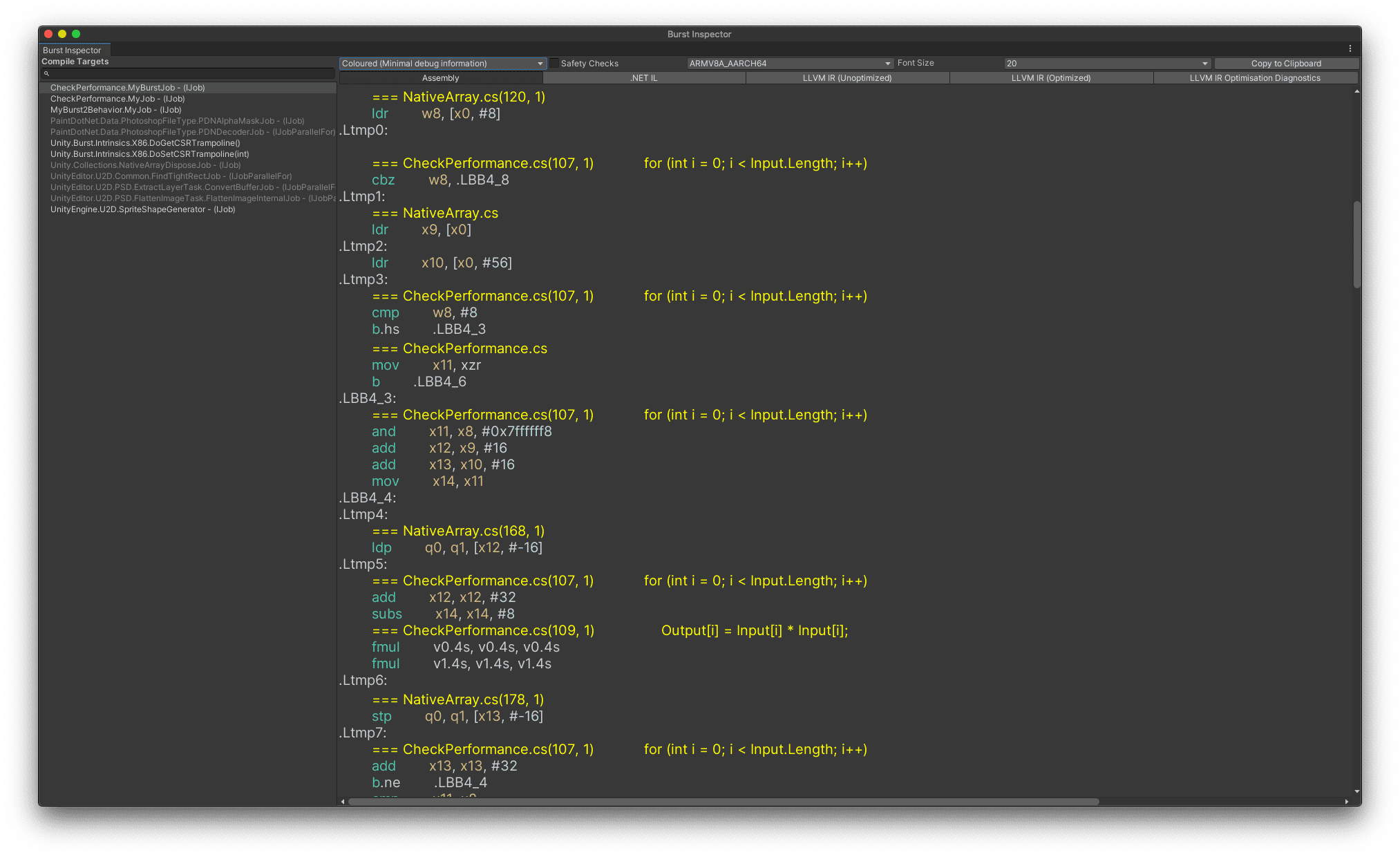
Figure 9.2: Using the Burst Inspector, you can check what kind of assembly the code will be converted to.
List 9.14 The process on line 14 of the code will be converted to List 9.15 in an assembly for ARMV8A_AARCH64.
List 9.15: List 9.14 Line 14 of the assembly for ARMV8A_AARCH64
        fmul        v0.4s, v0.4s, v0.4s
        fmul        v1.4s, v1.4s, v1.4s
|
The fact that the operand of the assembly is suffixed with .4s confirms that the SIMD instruction is used.
The performance of the code implemented with pure C# and the code optimized with Burst are compared on a real device.
The actual devices are Android Pixel 4a and IL2CPP built with a script backend for comparison. The array size is 2^20 = 1,048,576.The same process was repeated 10 times and the average processing time was taken.
Table 9.1 The results of the performance comparison are shown in Figure 2.
Table 9.1: Comparison of processing time between pure C# implementation and Burst optimized code
| Method | Processing time (hidden) |
|---|---|
| Pure C# implementation | 5.73 ms |
| Implementation with Burst | 0.98ms |
We observed a speedup of about 5.8 times compared to the pure C# implementation.