Chapter 6. iOS Memory Limits and Virtual Address Space
The memory available to a game on a device naturally has an upper limit. This limit becomes a problem when assets overlap during a scene transition or when temporary rendering buffers increase.
In addition to reducing the memory peak within the game, there is also room to adjust the memory limit itself. Xcode's "Increased Memory Limit" is a setting that raises that limit on supported devices. A different setting, "Extended Virtual Addressing", expands the virtual address space available to the process. The names are similar, but they address different areas.
This chapter introduces how to choose between the two settings, their effects on physical devices, and experience operating them on the App Store. The numbers come from the author's measurements on physical devices and are not per-device limits guaranteed by Apple.
6.1. Memory Limit and Virtual Address Space Are Separate Constraints
When an app runs out of memory (OOM), you need to distinguish at least the following two cases.
Table 6.1: Two types of memory constraints to distinguish in iOS apps
| Constraint | Main values to check | Typical manifestation |
|---|---|---|
| Physical memory | phys_footprint | The system terminates the app for high memory use (jetsam) |
| Virtual address space | VM Region Summary, Virtual Size | Memory allocation fails, followed by a crash |
Physical memory relates to the pages that must actually be held in RAM. On iOS, the amount of physical memory an app can use is not the installed RAM itself. It also depends on the system state at that moment and the limit applied to the app.
Apple's os_proc_available_memory() returns the amount that can be allocated before the current app reaches its memory limit. According to Apple's description, this return value corresponds to the “current memory limit minus the app's memory footprint” and is not necessarily the same as the device's free physical memory. The limit can also change during the app lifecycle, so do not cache the value and treat it as reference information *1.
The virtual address space is the range that manages which addresses memory and files are mapped to. For example, even if you mmap a large file, not all of its pages are necessarily loaded into RAM immediately. However, virtual addresses are still needed to hold that range. Conversely, even when the physical memory footprint is still low and os_proc_available_memory() has headroom, a new address range may fail to be reserved, causing malloc and similar calls to fail.
Therefore, to distinguish the two kinds of constraints in Table 6.1, you need to check whether a jetsam report remains or whether an allocation failure is the starting point in an ordinary crash report. Even if os_proc_available_memory() returns a large value, the virtual address space does not necessarily have the same amount of headroom.
6.2. Roles of the Two Entitlements
6.2.1. Increased Memory Limit
The key for Increased Memory Limit is com.apple.developer.kernel.increased-memory-limit. Apple describes it as an entitlement that tells the system that exceeding the default app memory limit on supported devices may improve the app's core functionality *2. The Xcode Capability list also shows a conditional description such as “on supported devices”, as in Figure 6.1.
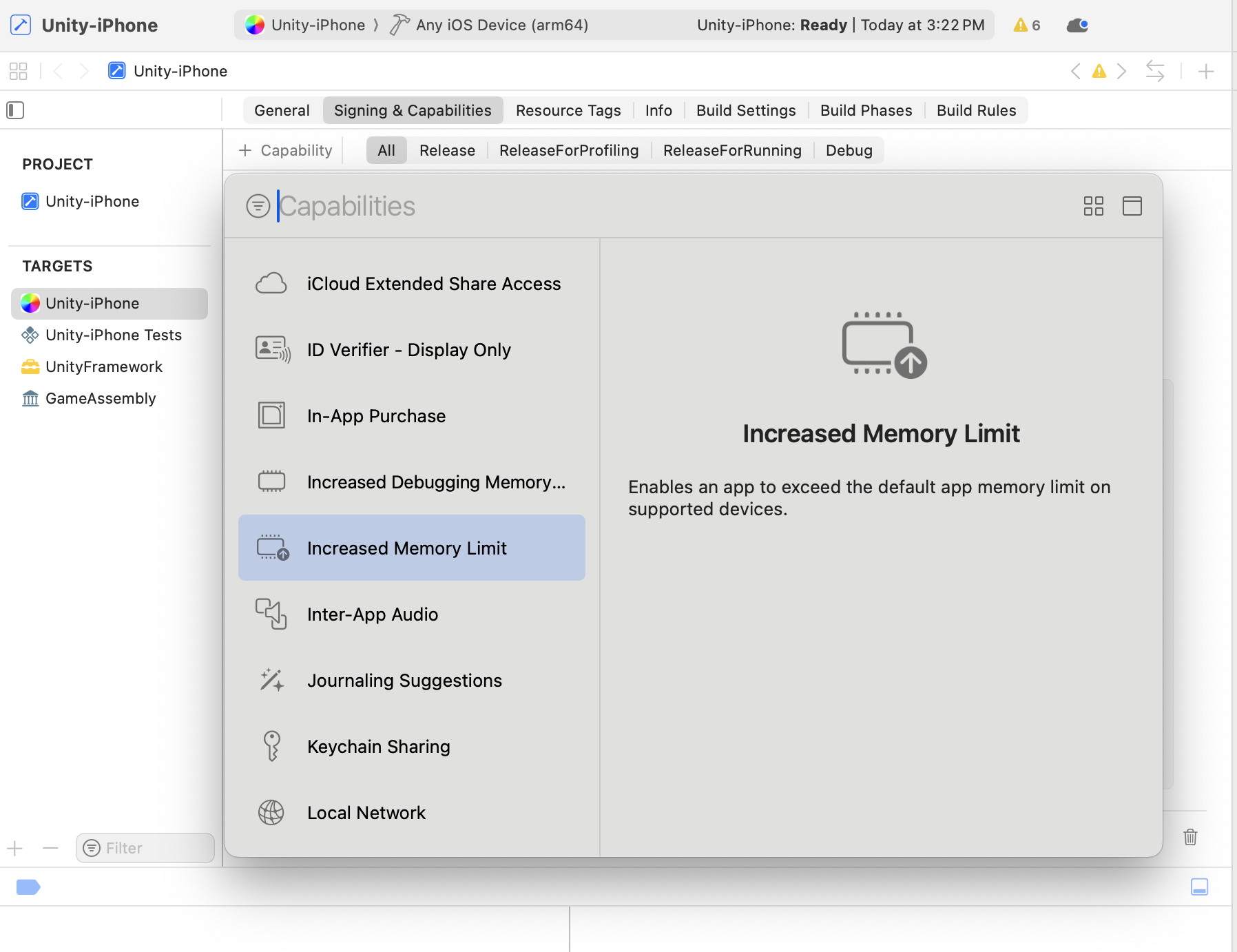
Figure 6.1: Increased Memory Limit shown in the Xcode Capability list
In other words, specifying it does not add a fixed amount on every device. Apple's documentation also states that only some devices can use the increased limit, and asks that apps work correctly even when the additional memory is unavailable.
Measuring Increased Memory Limit on physical devices
Table 6.2: Memory measured at OOM with and without Increased Memory Limit (iPhone)
| Installed RAM | Disabled | Enabled |
|---|---|---|
| 3GB | About 1,850MB | About 1,850MB |
| 4 GB | About 2,050 MB | About 2,290 MB |
| 6 GB | About 3 GB | About 4 GB |
Memory increased on the 4GB and 6GB iPhones, whereas on the 3GB iPhone there was no difference between enabled and disabled. Also, the memory at OOM on iPad differs from that on iPhone to begin with, so the result when enabled is likely to differ as well. If 3GB iPhones account for a large share of your target users' devices, you should not expect that simply adding Increased Memory Limit will rescue them.
6.2.2. Extended Virtual Addressing
The key for Extended Virtual Addressing is com.apple.developer.kernel.extended-virtual-addressing. Apple describes it as a Boolean value indicating access to a larger address space, and gives games as an example *3.
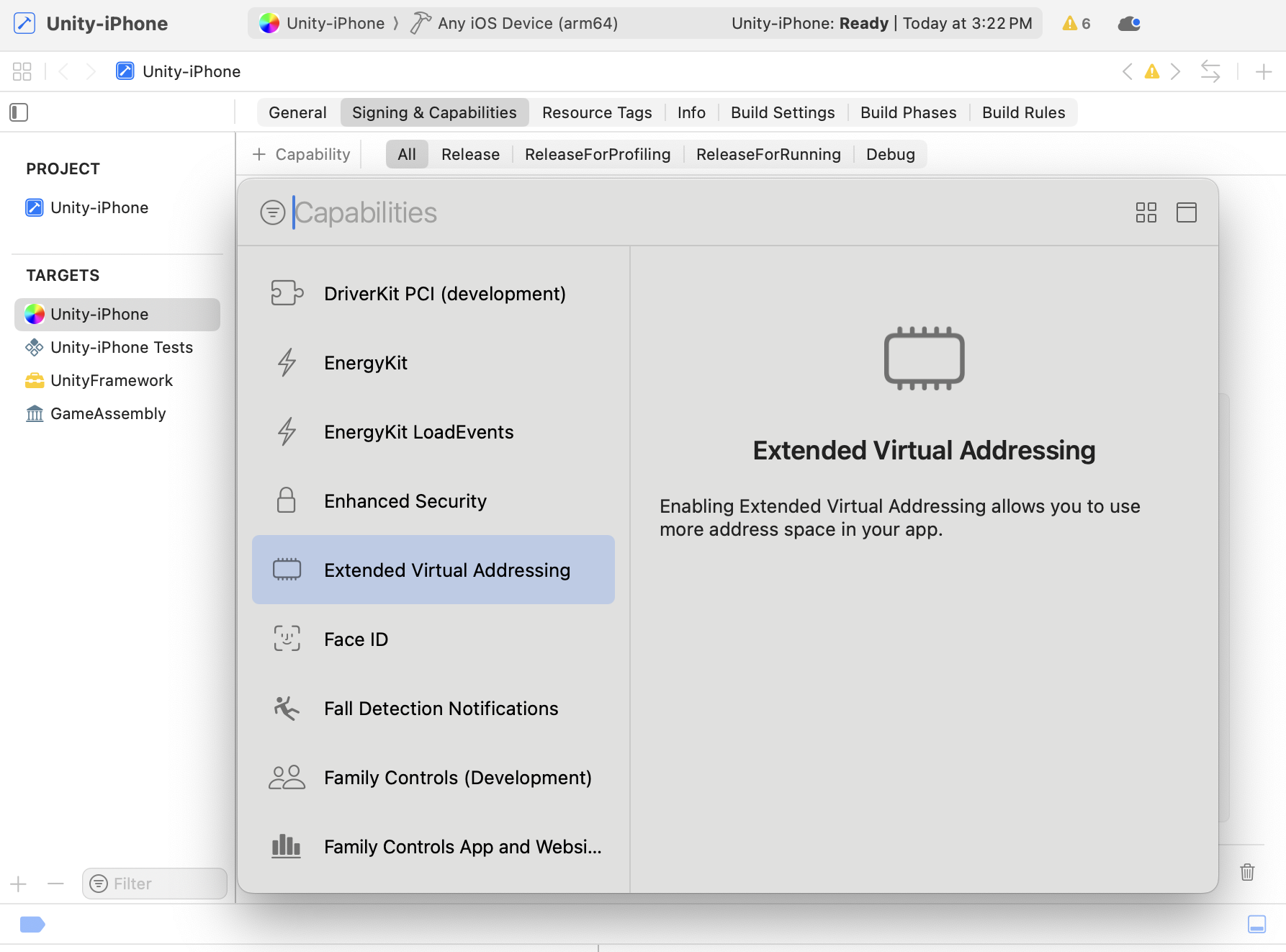
Figure 6.2: Extended Virtual Addressing shown in the Xcode Capability list
This setting does not add RAM. For an app that is jetsammed as it approaches the physical memory limit, adding only Extended Virtual Addressing does not guarantee that it can keep using the same amount of RAM. It is expected to help when the virtual address space becomes constrained before physical memory is exhausted, because of large memory maps, fragmented address regions, or large fixed reservations.
Enabling it has almost no cost. Page tables are created only for the range actually mapped, so they do not grow when the limit is widened *4. What to consider is whether there are devices on which it has an effect. Adding Increased Memory Limit also widens the address space, so there are devices on which max_address does not change even when both are added.
On the other hand, on devices where Increased Memory Limit has no effect, such as the 3GB device in Table 6.2, Extended Virtual Addressing is the only means of widening the address space. Increased Memory Limit is ineffective if the device does not support it, even if the signature is correct, but Extended Virtual Addressing has no such condition.
Virtual Address Space Limits
What Extended Virtual Addressing widens is the address space limit, which is separate from the footprint limit. This limit is determined by one of the Table 6.3 values that pmap_max_64bit_offset() returns according to the installed memory *5.
Table 6.3: Address space limits for arm64 user processes
| Condition | Constant | Limit |
|---|---|---|
max_mem > 3GB | ARM64_MAX_OFFSET_DEVICE_LARGE | 17.375GB |
max_mem above 1 GB up to 3 GB | ARM64_MAX_OFFSET_DEVICE_SMALL | 13.375 GB |
max_mem 1 GB or less | ARM64_MIN_MAX_ADDRESS | 12.5 GB |
| Extended by any means, including entitlements | MACH_VM_JUMBO_ADDRESS | 63 GB |
max_mem is the physical memory recognized by the kernel and is smaller than the RAM capacity in the catalog specifications. All of these are kernel compile-time constants, so they may change between OS versions.
6.2.3. Track Record on the App Store
A concern when adopting these Entitlements is whether they affect App Store review. Among several titles in operation that the author knows of, there are ones that enabled either Increased Memory Limit or Extended Virtual Addressing, passed App Store review, and are being distributed.
Apple itself, in "Bring your high-end game to iPhone 15 Pro" *6 for game developers, advises enabling Increased Memory Limit to increase the available memory. These two are public features that you can consider adopting in a product. This does not guarantee the review result of an individual app as a whole, but there is no need to rule them out for fear that, because they concern the memory limit, review might ask for an explanation or reject the app.
6.3. Check the App ID and Developer Account
6.3.1. Wildcard Profiles Cannot Be Used
These two Entitlements cannot be enabled with a wildcard App ID. If you sign multiple apps together, as in com.example.*, you need to switch to an Explicit App ID that matches the game's Bundle ID.
If you try to sign with it as is, Xcode's Signing & Capabilities shows the error Figure 6.3. Note that the capability name and the entitlement key are reported separately. Both are pointed out: the profile does not include the capability, and there is no permission corresponding to the key.
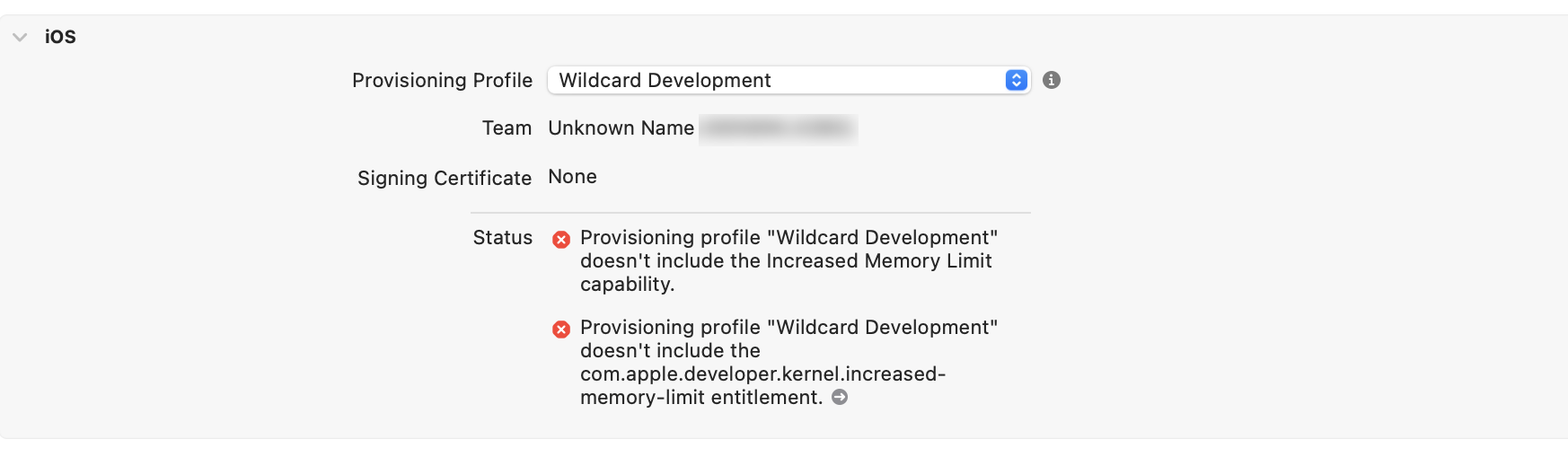
Figure 6.3: Error when trying to sign with a wildcard Provisioning Profile
In Certificates, Identifiers & Profiles on Apple Developer, select the target App ID and enable the required capability, as in Figure 6.4. Apple also explains that the capabilities set on an App ID serve as an allow list of features the app can use, and that features requiring an Explicit App ID cannot be selected with a wildcard *7.
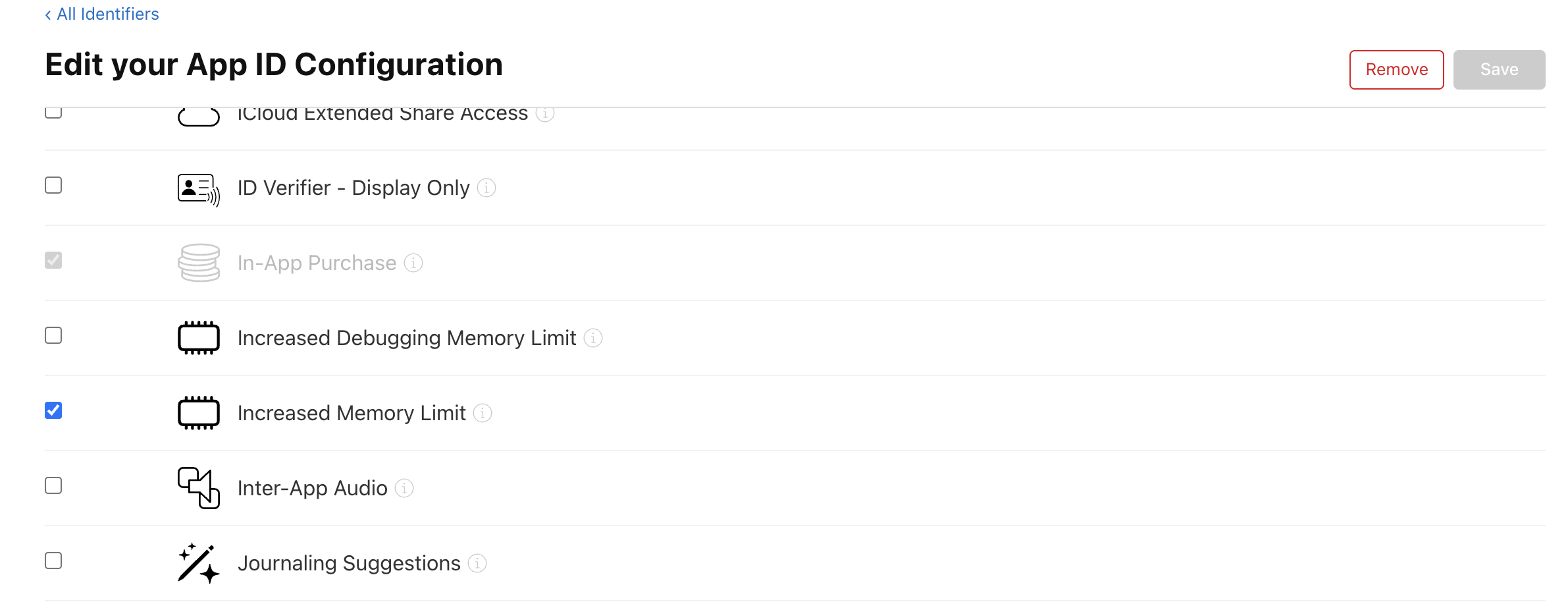
Figure 6.4: Enabling Increased Memory Limit in the App ID settings
With manual signing, regenerate the Provisioning Profile after changing capabilities and update the one used by the build. With automatic signing, confirm that the updated profile is selected for the correct Team and Bundle ID. If you only add keys to .entitlements while keeping the old profile, the permissions the app requests do not match the permissions on the signing side. Align these first, before investigating the Unity-side settings.
6.3.2. Extended Virtual Addressing Requires a Paid Membership
Extended Virtual Addressing cannot be enabled in a configuration that uses a free Apple Account as the Personal Team in Xcode. Apple's capability support table lists as eligible memberships in the Apple Developer Program and the Apple Developer Enterprise Program, and does not include free Apple Accounts *8.
On the other hand, Increased Memory Limit can be enabled even with a Personal Team.
6.4. Configure Automatically in the Unity Post-Build Process
The minimum content of the Entitlements file is List 6.1. This is an example that enables both at the same time.
List 6.1: Minimal memory-related entitlements
1 2 3 4 5 6 7 8 9 10 | <?xml version="1.0" encoding="UTF-8"?> <!DOCTYPE plist PUBLIC "-//Apple//DTD PLIST 1.0//EN" "http://www.apple.com/DTDs/PropertyList-1.0.dtd"> <plist version="1.0"> <dict> <key>com.apple.developer.kernel.increased-memory-limit</key> <true/> <key>com.apple.developer.kernel.extended-virtual-addressing</key> <true/> </dict> </plist> |
You can also add them manually from Xcode's Signing & Capabilities, but you would have to re-add them at every export, which makes it easy for builds with missing settings to slip in. In Unity, a post-build process can update the Entitlements file and the CODE_SIGN_ENTITLEMENTS that references it together. The process runs at build time, before signing, and does not obtain the permission from C# after the app launches.
6.4.1. Use the Dedicated API in Unity 6000.0.11f1 and Later
In Unity 6000.0.11f1, the following methods were added to ProjectCapabilityManager *9.
AddIncreasedMemoryLimit()AddExtendedVirtualAddressing()
With these, you can add Boolean values to the entitlements and reflect them in the Xcode project in a single step.
A corresponding definition of PBXCapabilityType is also provided. However, this is not a C# enum but a class that represents the requirements of a Capability. Passing this value to PBXProject.AddCapability() is not the same as adding the necessary keys to the Entitlements. Therefore, you basically use ProjectCapabilityManager, which handles both.
The following is a sample that adds a Capability using ProjectCapabilityManager.
List 6.2: Post-build process that adds memory capabilities in Unity 6000.0.11f1 and later
1 2 3 4 5 6 7 8 9 10 11 12 13 14 15 16 17 18 19 20 21 22 23 24 25 26 27 28 29 30 | #if UNITY_IOS using UnityEditor; using UnityEditor.Callbacks; using UnityEditor.iOS.Xcode; static class IosMemoryCapabilities { [PostProcessBuild] static void OnPostprocessBuild(BuildTarget target, string buildPath) { if (target != BuildTarget.iOS) return; string pbxPath = PBXProject.GetPBXProjectPath(buildPath); var pbx = new PBXProject(); pbx.ReadFromFile(pbxPath); string mainTarget = pbx.GetUnityMainTargetGuid(); string entitlements = pbx.GetBuildPropertyForAnyConfig( mainTarget, "CODE_SIGN_ENTITLEMENTS"); if (string.IsNullOrEmpty(entitlements)) entitlements = "Unity-iPhone.entitlements"; var capabilities = new ProjectCapabilityManager( pbxPath, entitlements, targetGuid: mainTarget); capabilities.AddIncreasedMemoryLimit(); capabilities.AddExtendedVirtualAddressing(); capabilities.WriteToFile(); } } #endif |
UnityEditor.iOS.Xcode is included in iOS Build Support, so enclose it with #if UNITY_IOS. Otherwise, compilation of the entire Editor fails in an environment without this module, so be careful.
This sample targets a configuration that uses a common Entitlements file for all build configurations and specifies its path relative to the Xcode project. If you use separate files for Debug and Release, or include build variables in the path, adapt it to the processing that applies the change to the actual file of each configuration.
The final save is done with capabilities.WriteToFile(). If other post-build processes edit the Xcode project, re-saving pbx may cause the Capability Manager to overwrite the saved changes, so be careful to reload the updated file before modifying it.
6.4.2. Update the plist Directly in Versions Without the Dedicated API
To perform the same processing in an Editor without the dedicated API, replace the five lines from generating ProjectCapabilityManager of List 6.2 to saving it with List 6.3.
List 6.3: Alternative process for Unity without the dedicated Capability API
1 2 3 4 5 6 7 8 9 10 11 12 13 14 15 16 17 | string fullPath = System.IO.Path.Combine(buildPath, entitlements); System.IO.Directory.CreateDirectory( System.IO.Path.GetDirectoryName(fullPath)); var plist = new PlistDocument(); if (System.IO.File.Exists(fullPath)) plist.ReadFromFile(fullPath); plist.root.SetBoolean( "com.apple.developer.kernel.increased-memory-limit", true); plist.root.SetBoolean( "com.apple.developer.kernel.extended-virtual-addressing", true); plist.WriteToFile(fullPath); if (string.IsNullOrEmpty(pbx.FindFileGuidByProjectPath(entitlements))) pbx.AddFile(entitlements, entitlements); pbx.SetBuildProperty(mainTarget, "CODE_SIGN_ENTITLEMENTS", entitlements); pbx.WriteToFile(pbxPath); |
By loading the existing file and then adding the two keys, it updates without deleting Entitlements such as Push notifications. What is modified is .entitlements, not Info.plist. Also, the file is used for signing only when it is referenced from CODE_SIGN_ENTITLEMENTS.
Adding C# code alone does not enable the permission on the account side. With either method, the App ID and Provisioning Profile on the Apple Developer side must be set up separately.
6.5. Verify the application in two steps
Verify whether the settings are reflected in two steps: whether the keys are in the signature, and whether the kernel applied them on a physical device.
6.5.1. Verify that they are included in the signature
Whether done manually or in post-build processing, the mere existence of a List 6.1 file in the project is not evidence that it is reflected in the app installed on the device. Entitlements are ultimately embedded in the code signature. The exported .ipa is in zip format, so extract it and run List 6.4 on the app binary in Payload.
List 6.4: Checking the entitlements embedded in the signed app
1 2 | unzip -q YourApp.ipa -d ipa codesign --display --entitlements :- ipa/Payload/YourApp.app |
In the output plist, check whether the two keys of List 6.1 are present. Apple also advises post-signing verification with this command *10.
6.5.2. Verify that the limit changed on a physical device
Even if the keys are visible in List 6.4, it does not mean the kernel actually applied them. If the device does not support Increased Memory Limit, it is treated as ineffective even when signing is correct.
Whether it is applied on a physical device is determined by directly reading the values the kernel holds for its own process. task_info() retrieves them; it is a Mach API included as standard in the iOS SDK (<mach/mach.h>). It cannot be called from C#, so it is read from the .mm placed in Assets/Plugins/iOS/ and returned to C#.
List 6.5: Native plugin that reads the application status
1 2 3 4 5 6 7 8 9 10 11 12 13 14 15 | #import <mach/mach.h> extern "C" void UPT_ReadLimits(uint64_t *memlimit, uint64_t *ceiling) { task_vm_info_data_t i; mach_msg_type_number_t c = TASK_VM_INFO_COUNT; if (task_info(mach_task_self(), TASK_VM_INFO, (task_info_t)&i, &c) != KERN_SUCCESS) { return; } // Footprint limit (Increased Memory Limit) *memlimit = i.limit_bytes_remaining + i.phys_footprint; // Address space limit: extended if it has grown to 0xF_C000_0000 *ceiling = i.max_address; } |
On the C# side, declare UPT_ReadLimits with DllImport("__Internal") and call it.
The value to look at is the limit. The remaining amount returned by os_proc_available_memory() decreases as the footprint grows, so looking at the value alone cannot distinguish whether the limit has not risen or the app has simply used more.
limit_bytes_remaining is obtained from the same kernel function as that os_proc_available_memory() *11, so adding the current footprint restores the limit in effect. The address-space-side max_address can also be obtained from the same structure, so a single call can verify both entitlements. max_address is filled only when you pass TASK_VM_INFO_COUNT.
However, the effect of Extended Virtual Addressing alone cannot be isolated from max_address. The same limit appears in a build with Increased Memory Limit and in a build with Xcode's Enhanced Security enabled. What can be confirmed is only whether the limit has expanded to 63GB.
6.6. Virtual Address Reservation That Became Apparent in iOS 26.4
6.6.1. JS VM Gigacage (reserved) Is Not 1 GB of RAM Usage
In verification on a 3GB iPhone running iOS 26.4, a region of about 1GB appeared as JS VM Gigacage (reserved) in the VM Region Summary of the crash report, and enabling Extended Virtual Addressing prevented the drop in memory at OOM. This region is not the actual Gigacage but a JavaScriptCore Structure Heap reservation displayed under a reused existing VM tag name *12.
6.6.2. The WebKit Fix Reduces the Reservation According to Device RAM
The public JavaScriptCore bug 315240 records a policy of reducing the reservation according to the amount of physical memory, because on low-memory devices the Structure Heap reservation occupies a large share of the virtual address space *13.
In the WebKit commit that addresses this issue, for iOS-family platforms, the smaller of the base reservation size and 20% of physical memory is taken, and then rounding it down to a power of two. The public commit description gives an example of 512 MB for a 3 GB device *14.
When measured on an iPhone SE (2nd generation, 3GB RAM) with iOS 26.6.1, which includes this fix, the displayed reservation shrank from about 1GB to 512MB, and the drop in memory at OOM seen in 26.4 was resolved even without enabling Extended Virtual Addressing.
6.7. Summary
Increased Memory Limit and Extended Virtual Addressing are settings that lose almost nothing when enabled. Page tables are created only for the range actually mapped, so widening the address space does not increase the cost. There is also a track record of passing App Store review and being distributed. As long as you can prepare the Explicit App ID and profile, we think it is generally good to enable both.
However, the effect depends on the device. In the author's measurements on iPhones, the headroom gained from Increased Memory Limit was about 240MB on 4GB devices and about 1GB on 6GB devices, but there was no difference on 3GB devices. iPad requires separate measurement. Extended Virtual Addressing does not increase physical memory and is effective only when the virtual address space runs out first. The Structure Heap reservation issue seen in iOS 26.4 was mitigated in the iOS 26.6 series, but it can still be expected to help when supporting older OS versions or when the app's own memory map uses a lot of address space.
Neither reduces memory usage itself. To keep running on devices without the additional limit, you still need separate work to reduce the peak of textures and temporary RenderTextures, the residency period of assets, large allocations of native plugins, and the lifetime of file mappings. Use the two Entitlements as settings that widen the headroom remaining after that.
[*1] Apple Developer Documentation, os_proc_available_memory https://developer.apple.com/documentation/os/os_proc_available_memory
[*2] Apple Developer Documentation, com.apple.developer.kernel.increased-memory-limit https://developer.apple.com/documentation/bundleresources/entitlements/com.apple.developer.kernel.increased-memory-limit
[*3] Apple Developer Documentation, Extended Virtual Addressing Entitlement https://developer.apple.com/documentation/bundleresources/entitlements/com.apple.developer.kernel.extended-virtual-addressing
[*4] Apple Open Source, xnu-12377.121.6, osfmk/arm/pmap/pmap.c(pmap_max_64bit_offset) https://github.com/apple-oss-distributions/xnu/blob/xnu-12377.121.6/osfmk/arm/pmap/pmap.c
[*5] Apple Open Source, xnu-12377.121.6, osfmk/arm/pmap/pmap.c(pmap_max_64bit_offset) https://github.com/apple-oss-distributions/xnu/blob/xnu-12377.121.6/osfmk/arm/pmap/pmap.c
[*6] Apple Developer Tech Talks, Bring your high-end game to iPhone 15 Pro https://developer.apple.com/videos/play/tech-talks/111372/
[*7] Apple Developer, Register an App ID https://developer.apple.com/help/account/identifiers/register-an-app-id/
[*8] Apple Developer, Supported capabilities (iOS) https://developer.apple.com/help/account/reference/supported-capabilities-ios/
[*9] Unity 6.0 Scripting API, ProjectCapabilityManager https://docs.unity3d.com/6000.0/Documentation/ScriptReference/iOS.Xcode.ProjectCapabilityManager.html
[*10] Apple Developer Documentation, Diagnosing Issues with Entitlements https://developer.apple.com/documentation/bundleresources/diagnosing-issues-with-entitlements
[*11] Apple Open Source, xnu-12377.121.6, bsd/kern/kern_memorystatus.c(memorystatus_available_memory_internal) https://github.com/apple-oss-distributions/xnu/blob/xnu-12377.121.6/bsd/kern/kern_memorystatus.c
[*12] Apple Developer Forums, iPadOS 26.4+ significantly reduced per-app memory limit from 6GB to 3GB on 8GB iPad, breaking memory-intensive apps https://developer.apple.com/forums/thread/826325
[*13] WebKit Bugzilla 315240, Scale down StructureAlignedMemoryAllocator reservation in proportion to phys-mem size https://bugs.webkit.org/show_bug.cgi?id=315240
[*14] WebKit commit cffeaa6ccbf42e8d5ff626cc9806f7eac3c66e6b, Scale down structure-heap reservation size with physical memory https://github.com/WebKit/WebKit/commit/cffeaa6ccbf42e8d5ff626cc9806f7eac3c66e6b