Chapter 3. How to Omit URP's FinalBlitPass
3.1. What Is FinalBlitPass
In the URP rendering pipeline, what is actually displayed on the screen is the BackBuffer. However, the BackBuffer is write-only and cannot be read. Therefore, when there is processing that reads intermediate results as input, such as post-processing, the camera first renders to an intermediate texture, which is finally blitted to the BackBuffer. The URP pass responsible for blitting from this intermediate texture to the BackBuffer is FinalBlitPass. It is not a mere copy; it also handles the final processing required immediately before output to the screen.
- Transfer that takes the camera Viewport into account
- Linear to sRGB conversion
- Encoding for HDR Output and compositing of the overlay UI
- Y flip when the UV origins differ
- Filter switching when scaling
3.1.1. Three Kinds of FinalBlitPass with the FinalBlit Function
URP actually has three kinds of passes whose role is to output the intermediate texture to the BackBuffer, and only one of them is selected depending on conditions.
UberPost
This pass is added when post-processing is enabled, and it also serves as the FinalBlit when the following conditions are met.
- It is the last camera in the camera stack
- FinalPost, described below, is not required
- There is no custom pass that runs at or after AfterRenderingPostProcessing
FinalPost
This pass is added when post-processing is enabled and there is a final step that UberPost cannot handle.
- FXAA
- Upscaling other than Linear: Point / FSR / STP, and so on.
- TAA + CAS: RCAS sharpening must be run in a separate pass
FinalBlitPass
This is the last resort when neither of the above two writes to the BackBuffer. It actually appears mainly in the following cases.
- Post-processing is disabled and an intermediate texture exists
- Post-processing is enabled, but there is a custom pass after it
- Post-processing is enabled, but there is capture processing such as Camera.AddCommandBufferAsync
Relationship Among the Three
Table 3.1: Passes responsible for the final output and their conditions
| Pass responsible for the final output | Condition |
|---|---|
| UberPost | Post-processing enabled, FinalPost not required, and no subsequent custom pass or capture |
| FinalPost | Post-processing enabled, and any of FXAA / upscaling other than Linear / TAA + CAS |
| FinalBlitPass | The above two do not write to the BackBuffer, and an intermediate texture exists |
| None of them | There is no intermediate texture, or the camera is not the last one in the camera stack |
3.2. How to Omit FinalBlitPass
You do not need to be concerned about FinalBlitPass when using URP post-processing or creating a regular custom post-process. However, if you add a custom pass that corresponds to the "final step," URP's FinalBlitPass becomes a wasteful pass that only inserts one extra blit. Therefore, starting with Unity 6.3, a custom pass can declare that "the active target is now the BackBuffer," which allows URP's FinalBlitPass to be omitted.
List 3.1: Switching to the BackBuffer
1 2 | var resourceData = frameData.Get<UniversalResourceData>(); resourceData.SwitchActiveTexturesToBackbuffer(); |
The implementation is simple (Runtime/FrameData/UniversalResourceData.cs).
List 3.2: Implementation of SwitchActiveTexturesToBackbuffer
1 2 3 4 5 | public void SwitchActiveTexturesToBackbuffer() { activeColorID = UniversalResourceData.ActiveID.BackBuffer; activeDepthID = UniversalResourceData.ActiveID.BackBuffer; } |
It only rewrites two IDs in frameData, and performs no blit, no copy, and no addition of a RenderPass. This API is not a "transfer operation" but a declaration to URP. activeColorTexture / activeDepthTexture are simply a switch that changes the TextureHandle they return based on these IDs.
List 3.3: Switching activeColorTexture
1 2 3 4 5 6 7 8 9 10 11 12 | public TextureHandle activeColorTexture { get { switch (activeColorID) { case ActiveID.Camera: return cameraColor; case ActiveID.BackBuffer: return backBufferColor; ... } } } |
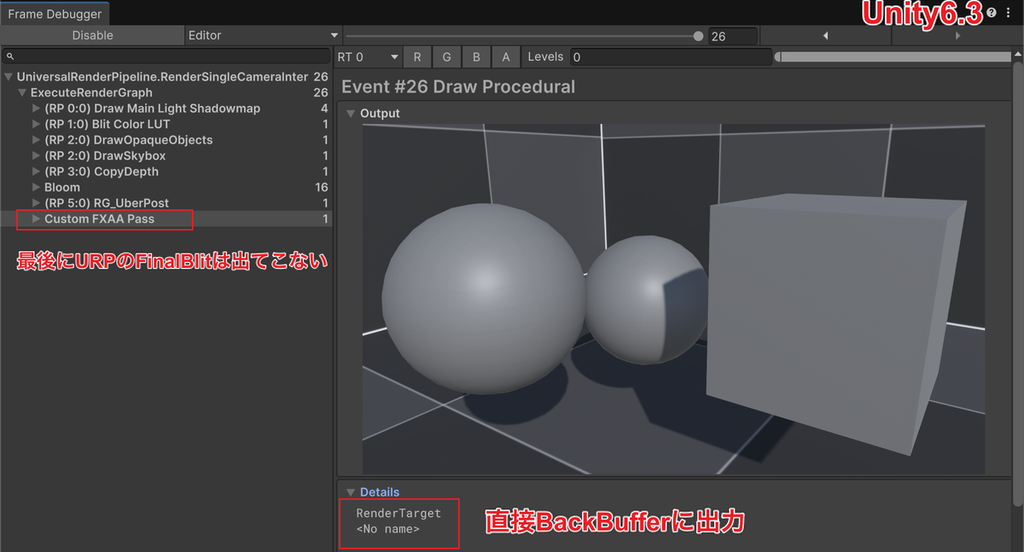
After SwitchActiveTexturesToBackbuffer() is executed, URP's FinalBlitPass is no longer generated.
3.2.1. Usage Example: Custom FXAA
Taking a custom FXAA post-process as an example, we compare the flows before and after. The typical flow in the past required three blits.
List 3.4: Conventional FXAA flow
1 | CameraColor → [FXAA] → FXAABuffer → [Blit] → CameraColor → [URP FinalBlit] → BackBuffer |
From Unity 6.0 onward, CameraColor can be swapped directly, which reduces the number of blits to two, but an intermediate texture called FXAABuffer is still required, and FinalBlitPass is still created.
List 3.5: FXAA flow in Unity 6.0
1 | CameraColor → [FXAA] → FXAABuffer → [URP FinalBlit] → BackBuffer |
With the BackBuffer switch in Unity 6.3, one blit is enough. No intermediate texture is needed either.
List 3.6: FXAA flow in Unity 6.3
1 | CameraColor → [FXAA] → BackBuffer |
The code looks as follows. Note that the code that follows is partly excerpted to show the key points and does not work as is.
List 3.7: Custom FXAA that outputs directly to the BackBuffer
1 2 3 4 5 6 7 8 9 10 11 12 13 14 15 16 17 18 19 20 21 22 23 24 25 26 27 28 29 30 31 32 33 34 35 36 37 38 39 40 41 | private class PassData { public TextureHandle Source; public TextureHandle Target; public Material FXAAMaterial; } public override void RecordRenderGraph(RenderGraph renderGraph, ContextContainer frameData) { var cameraData = frameData.Get<UniversalCameraData>(); var resourceData = frameData.Get<UniversalResourceData>(); // Obtain CameraColor before switching var cameraColor = resourceData.activeColorTexture; // From here on, activeColorTexture returns BackBufferColor // This stops URP's FinalBlitPass from being generated resourceData.SwitchActiveTexturesToBackbuffer(); var backBufferColor = resourceData.activeColorTexture; // Determine whether LinearToSRGBConversion is needed var requireSrgbConversion = cameraData.targetTexture == null && Display.main.requiresSrgbBlitToBackbuffer; CoreUtils.SetKeyword(_fxaaMaterial, ShaderKeywordStrings.LinearToSRGBConversion, requireSrgbConversion); using (var builder = renderGraph.AddRasterRenderPass<PassData>("Custom FXAA Pass", out var passData)) { passData.Source = cameraColor; passData.Target = backBufferColor; passData.FXAAMaterial = _fxaaMaterial; builder.SetRenderAttachment(backBufferColor, 0, AccessFlags.WriteAll); builder.UseTexture(passData.Source, AccessFlags.Read); builder.SetRenderFunc(static (PassData data, RasterGraphContext context) => { // A Y flip is needed only when the UV origins of Source and Target differ var yFlip = context.GetTextureUVOrigin(data.Source) != context.GetTextureUVOrigin(data.Target); var scaleBias = yFlip ? new Vector4(1, -1, 0, 1) : new Vector4(1, 1, 0, 0); Blitter.BlitTexture(context.cmd, data.Source, scaleBias, data.FXAAMaterial, 0); }); } } |
In Unity 6.0, FinalBlitPass was always created.
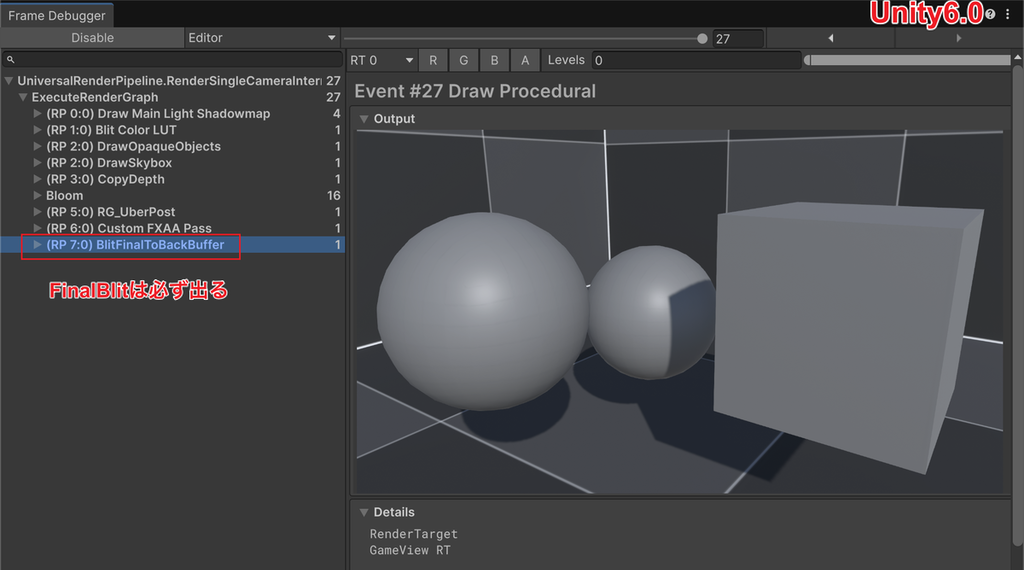
With the BackBuffer switch in Unity 6.3, the FXAA processing completes in a single blit and is output directly to the BackBuffer.
3.3. Notes on Omitting URP's FinalBlit
SwitchActiveTexturesToBackbuffer() is an API that only rewrites internal texture IDs. Conversely, the caller is entirely responsible for keeping everything consistent.
3.3.1. Call SwitchActiveTexturesToBackbuffer() Only at the End of the Camera
From the moment this API is called, activeColorTexture / activeDepthTexture in all subsequent passes point to the BackBuffer. However, because the BackBuffer cannot be read, any subsequent processing that reads activeColorTexture / activeDepthTexture breaks. Also, do not switch when cameraData.resolveFinalTarget == false (there are subsequent cameras). Overlay cameras are designed to render on top of CameraColor, so if an intermediate camera writes directly to the BackBuffer, its output is mixed with or overwritten by the rendering results of subsequent cameras and disappears. Therefore, limit the call to the point immediately before the custom pass that performs the final output in the last camera.
3.3.2. Implement the FinalBlit Function in the Custom Pass That Runs Last
Omitting FinalBlitPass means that the final processing it handled also disappears. The custom pass must take over that work.
Y Flip
If the UV origins of Source and Target do not match, the screen is upside down unless flipped. Compare the two with GetTextureUVOrigin(), added in Unity 6.3, to make this determination. This API is available only on execution-time GraphContexts such as RasterGraphContext, so it must be called inside SetRenderFunc, not at RecordRenderGraph recording time.
List 3.8: Determining the Y flip
1 2 | var yFlip = context.GetTextureUVOrigin(data.Source) != context.GetTextureUVOrigin(data.Target); var scaleBias = yFlip ? new Vector4(1, -1, 0, 1) : new Vector4(1, 1, 0, 0); |
Note that SystemInfo.graphicsUVStartsAtTop only indicates the UV convention of the graphics API and cannot be used to determine whether a flip is needed for the current blit.
sRGB Conversion
You need to set the LinearToSRGBConversion keyword by checking cameraData.requireSrgbConversion, and implement the conversion in the shader according to that keyword.
List 3.9: Setting the sRGB conversion keyword
1 2 | var requireSrgbConversion = cameraData.targetTexture == null && Display.main.requiresSrgbBlitToBackbuffer; cmd.SetKeyword(ShaderGlobalKeywords.LinearToSRGBConversion, data.requireSrgbConversion); |
List 3.10: sRGB conversion
1 2 3 | #ifdef _LINEAR_TO_SRGB_CONVERSION color = LinearToSRGB(color); #endif |
Viewport Setup
The Viewport is normally set to the full screen, but if you want to set it to something other than the full screen, you need to set the Camera's Viewport.
List 3.11: Setting the Viewport
1 2 | var targetViewPort = new Rect(0, 0, targetWidth, targetHeight); cmd.SetViewport(targetViewPort); |
HDR Output and Overlay UI Compositing
Encoding for HDR display output and compositing of the overlay UI when cameraData.rendersOverlayUI is true were also the job of FinalBlitPass. A title that needs HDR output support must implement equivalent processing by using HDROutputUtils.
There may seem to be many requirements, but it is sufficient to implement only the features the project actually uses. For a title with fixed SDR, a full-screen Viewport, and no overlay UI, only the Y flip and sRGB conversion are effectively required.
3.4. Summary
- In URP, there are three kinds of passes responsible for the final output to the BackBuffer: UberPost / FinalPost / FinalBlitPass, and only one of them is selected depending on conditions
- If a custom pass is injected at or after AfterRenderingPostProcessing, hasPassesAfterPostProcessing becomes true and FinalBlitPass is almost always added
- With SwitchActiveTexturesToBackbuffer() in Unity 6.3, a custom pass can output directly to the BackBuffer, and this FinalBlitPass can be omitted
- However, this API is merely a declaration that rewrites the IDs of the camera's Active Color/Depth Texture. It must be called only in the final pass of the last camera, and the custom pass must itself handle the processing that FinalBlitPass carried out, such as the Y flip, sRGB conversion, and Viewport
A single full-screen blit is a cost that cannot be ignored at high resolutions and on mobile. For a project with custom post-processing, it is well worth considering.
3.5. References
- Unity Manual: Get data from the current frame in URP
https://docs.unity3d.com/6000.3/Documentation/Manual/urp/accessing-frame-data.html - Class UniversalResourceData | Universal Render Pipeline | 17.3
https://docs.unity3d.com/Packages/com.unity.render-pipelines.universal@17.3/api/UnityEngine.Rendering.Universal.UniversalResourceData.html - Struct RasterGraphContext | Scriptable Render Pipeline Core | 17.3
https://docs.unity3d.com/Packages/com.unity.render-pipelines.core@17.3/api/UnityEngine.Rendering.RenderGraphModule.RasterGraphContext.html