Chapter 4. Mobile Shader Optimization: Measuring and Reducing the Cost of Transcendental Functions
4.1. Introduction
Using transcendental functions such as sin and exp in a shader tends to increase the GPU processing load. This article uses Profiler measurements to explain how much these functions affect actual performance. It also covers an optimization technique that replaces transcendental functions with approximations, and presents measured values showing how much load reduction it actually achieves.
4.2. Environment
The Unity version, render pipeline, and devices used in this article are as follows.
| Unity version | Unity6000.3.20f1 |
|---|---|
| Render pipeline | Universal Render Pipeline 17.3.0 |
| iOS devices | iPhoneX iPhone14 iPhone15 Pro |
| Android device | Galaxy S9 |
4.3. Transcendental Functions
A transcendental function is a function that cannot be expressed with a finite number of arithmetic operations or radicals. Representative examples are trigonometric, exponential, and logarithmic functions.
- Trigonometric functions such as sin and cos
- Exponential functions such as pow and pow2
- Logarithmic functions such as log and log10
Transcendental functions are costly, so it is considered desirable to avoid using them heavily.
4.3.1. Why Transcendental Functions Are Heavy
Transcendental functions are expensive for the following three reasons.
- They take many clock cycles
- There are few units (SFUs) that perform transcendental function operations
- Overhead from register pressure
4.3.2. Reason 1: Many Clock Cycles
GPUs in smartphones and similar devices have many arithmetic logic units (ALUs) for performing arithmetic operations. An ALU is designed to execute an addition or multiplication in one clock cycle.
However, a transcendental function is not simple enough to be computed with a single instruction. When a GPU computes a transcendental function internally, it decomposes it into a combination of many additions and multiplications by using polynomial approximation algorithms such as the Taylor expansion and the minimax method.
Whereas a simple arithmetic operation finishes in one instruction, a transcendental function is expanded by the compiler into dozens of arithmetic instructions, so the processing time is longer.
4.3.3. Reason 2: Few SFUs
Many GPUs have dedicated hardware called the SFU (Special Function Unit) for processing transcendental functions and similar operations quickly, and transcendental functions are sometimes executed on the SFU.
The number of SFUs is very small compared with the number of ALUs, so even when a transcendental function is executed on the SFU, the processing takes a long time.
4.3.4. Reason 3: Overhead from Register Pressure
A transcendental function such as sin() is more complex to compute than simple addition or multiplication, and it requires more temporary registers for the computation inside the GPU.
The total amount of registers in each GPU compute unit (SM: Streaming Multiprocessor) is physically fixed, so as the number of registers consumed per thread increases (register pressure rises), the number of threads that can be packed into one SM decreases.
Because fewer threads can run at once, the processing takes a long time.
4.4. Load of Various Functions
For each loop count from 0 to 10, we measure the GPU time when executing various transcendental functions, to find out which transcendental function is the heaviest. FrameTimingManager is used to measure the GPU time.
4.5. Shader Used for Load Measurement
The following shader was used for the measurement. The transcendental function to execute can be selected with a shader keyword, and the loop count can be changed with the variable _LoopCount.
Shader "Benchmark/Transcendental"
{
    Properties
    {
        // uGUI (CanvasRenderer) binds the texture to "_MainTex", so the name is fixed
        [PerRendererData][MainTexture] _MainTex("Sprite Texture", 2D) = "white" {}
        [MainColor] _BaseColor("Tint", Color) = (1, 1, 1, 1)

        // Stencil settings for Mask (UI/Mask). The Mask component swaps the material and writes to it
        _StencilComp("Stencil Comparison", Float) = 8
        _Stencil("Stencil ID", Float) = 0
        _StencilOp("Stencil Operation", Float) = 0
        _StencilWriteMask("Stencil Write Mask", Float) = 255
        _StencilReadMask("Stencil Read Mask", Float) = 255

        _ColorMask("Color Mask", Float) = 15

        [Toggle(UNITY_UI_ALPHACLIP)] _UseUIAlphaClip("Use Alpha Clip", Float) = 0
    }

    SubShader
    {
        Tags
        {
            "Queue" = "Transparent"
            "RenderType" = "Transparent"
            "RenderPipeline" = "UniversalPipeline"
            "IgnoreProjector" = "True"
            "PreviewType" = "Plane"
            "CanUseSpriteAtlas" = "True"
        }

        Stencil
        {
            Ref [_Stencil]
            Comp [_StencilComp]
            Pass [_StencilOp]
            ReadMask [_StencilReadMask]
            WriteMask [_StencilWriteMask]
        }

        Cull Off
        ZWrite Off
        ZTest [unity_GUIZTestMode]
        Blend SrcAlpha OneMinusSrcAlpha
        ColorMask [_ColorMask]

        Pass
        {
            HLSLPROGRAM

            #pragma vertex vert
            #pragma fragment frag
            // The loop count is a uniform (dynamic loop), so 3.0 is required instead of 2.0
            #pragma target 3.0

            // Alpha Clip support for RectMask2D / Mask
            #pragma multi_compile_local _ UNITY_UI_CLIP_RECT
            #pragma multi_compile_local _ UNITY_UI_ALPHACLIP

            // Switching the transcendental function to measure. Since we want to switch it at runtime with Shader.EnableKeyword,
            // use multi_compile instead of shader_feature (which strips unused variants).
            // Each keyword produces a separate variant, so only the selected function appears in the generated code (no branching overhead).
            // Because it is a global keyword, it can be controlled collectively from TranscendentalBenchmark.
            // If no keyword is enabled, the first variant, _FUNC_NONE, is used.
            #pragma multi_compile_fragment _FUNC_NONE _FUNC_SIN _FUNC_SIN_APPROX _FUNC_COS _FUNC_TAN _FUNC_TAN_TAYLOR _FUNC_TAN_PADE _FUNC_ASIN _FUNC_ACOS _FUNC_ATAN _FUNC_EXP _FUNC_EXP2 _FUNC_POW _FUNC_LOG _FUNC_LOG2 _FUNC_LOG10

            #include "Packages/com.unity.render-pipelines.universal/ShaderLibrary/Core.hlsl"

            struct Attributes
            {
                float4 positionOS : POSITION;
                float4 color : COLOR;
                float2 uv : TEXCOORD0;
                UNITY_VERTEX_INPUT_INSTANCE_ID
            };

            struct Varyings
            {
                float4 positionHCS : SV_POSITION;
                float2 uv : TEXCOORD0;
                float4 positionOS : TEXCOORD1; // Kept in the same space as _ClipRect (Canvas local)
            };

            TEXTURE2D(_MainTex);
            SAMPLER(sampler_MainTex);

            CBUFFER_START(UnityPerMaterial)
                half4 _BaseColor;
            CBUFFER_END

            // A global value set from TranscendentalBenchmark.
            // It is not a per-material value, so it is not put in UnityPerMaterial (doing so would break the SRP Batcher)
            int _TranscendentalLoopCount;
            float _PowExponent;

            // Equivalent of UnityGet2DClipping in UnityUI.cginc (defined separately in HLSL)
            float Get2DClipping(float2 position, float4 clipRect)
            {
                float2 inside = step(clipRect.xy, position.xy) * step(position.xy, clipRect.zw);
                return inside.x * inside.y;
            }

            // Keep the value passed to the transcendental function within (0.05, 0.95).
            // This collectively avoids the asin/acos domain |x| <= 1, the log-family domain x > 0, and exp-family overflow.
            // It is preprocessing common to all variants, so its cost cancels out in the difference.
            float PrepareInput(float seed)
            {
                return seed;
                // return frac(seed) * 0.9 + 0.05;
            }

            float sinApprox(float x)
            {
                // Parabolic approximation of sin. It needs only multiplications and abs, so we look at the cost difference from the real sin instruction.
                // The domain is |x| <= PI (the output of PrepareInput falls within this range).
                // The coefficients are constant-folded, so there is no division cost at runtime.
                return (4.0 / PI) * x - (4.0 / (PI * PI)) * x * abs(x);
            }

            float tanTaylor(float x)
            {
                // Taylor expansion of tan up to the third order (multiplications only). We look at the cost difference from the real tan instruction.
                // The domain is |x| < PI/2, and accuracy drops rapidly beyond π/4.
                float x2 = x * x;
                return x * (1.0 + x2 * 0.3333333); // 1.0/3.0
            }

            float tanPade(float x)
            {
                // Pade approximation of tan (multiplications plus one division). The domain is |x| < PI/2.
                // The zero of the denominator, x ≈ ±1.581, is close to the poles of tan at ±PI/2, so the approximation follows the function up to near the poles.
                float x2 = x * x;
                return x * (15.0 - x2) / (15.0 - 6.0 * x2);
            }

            // The transcendental function to measure. Only one remains for each keyword,
            // so only the expanded result of the selected function appears in the generated code.
            float Transcendental(float x)
            {
                #if defined(_FUNC_SIN)
                    return sin(x);
                #elif defined(_FUNC_SIN_APPROX)
                    return sinApprox(x);
                #elif defined(_FUNC_COS)
                    return cos(x);
                #elif defined(_FUNC_TAN)
                    return tan(x);
                #elif defined(_FUNC_TAN_TAYLOR)
                    return tanTaylor(x);
                #elif defined(_FUNC_TAN_PADE)
                    return tanPade(x);
                #elif defined(_FUNC_ASIN)
                    return asin(x);
                #elif defined(_FUNC_ACOS)
                    return acos(x);
                #elif defined(_FUNC_ATAN)
                    return atan(x);
                #elif defined(_FUNC_EXP)
                    return exp(x);
                #elif defined(_FUNC_EXP2)
                    return exp2(x);
                #elif defined(_FUNC_POW)
                    // If the exponent is a constant, it is folded as in pow(x, 2) -> x * x,
                    // so a uniform is passed to go through the general-purpose pow path
                    return pow(x, _PowExponent);
                #elif defined(_FUNC_LOG)
                    return log(x);
                #elif defined(_FUNC_LOG2)
                    return log2(x);
                #elif defined(_FUNC_LOG10)
                    return log10(x);
                #else // _FUNC_NONE : baseline with no transcendental function
                    return x;
                #endif
            }

            Varyings vert(Attributes IN)
            {
                Varyings OUT;
                OUT.positionOS = IN.positionOS;
                OUT.positionHCS = TransformObjectToHClip(IN.positionOS.xyz);
                OUT.uv = IN.uv * 300.0;
                return OUT;
            }

            half4 frag(Varyings IN) : SV_Target
            {
                // This is the measurement target (it has no visual meaning).
                // UNITY_LOOP suppresses loop unrolling so that the cost for _TranscendentalLoopCount iterations is applied as is.
                // Except for the transcendental function itself, every variant has exactly the same form,
                // so the difference from _FUNC_NONE is the cost of that function.
                float accum = 0.0;

                UNITY_LOOP
                for (int i = 0; i < _TranscendentalLoopCount; i++)
                {
                    // If it were a loop invariant, it would be hoisted out of the loop, so i is mixed into the argument
                    float x = IN.uv.x + i * 0.017;

                    accum += Transcendental(x);
                }
                return half4(saturate(accum.xxx) * 0.02, 1);
            }
            ENDHLSL
        }
    }
}
4.6. Measurement Results
4.6.1. iPhone15 Pro
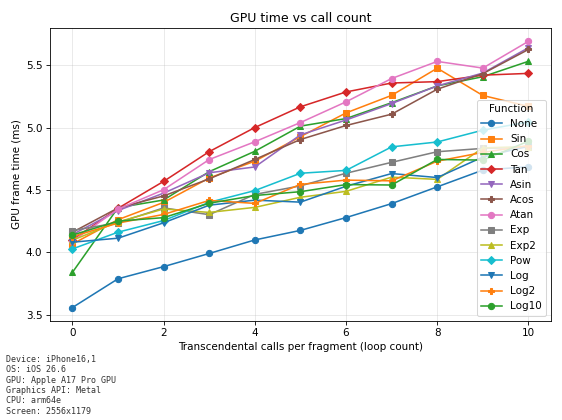
When the execution count is less than 7, tan is the heaviest, When the number of executions is 7 or more, Atan is the most expensive.
4.6.2. iPhone14
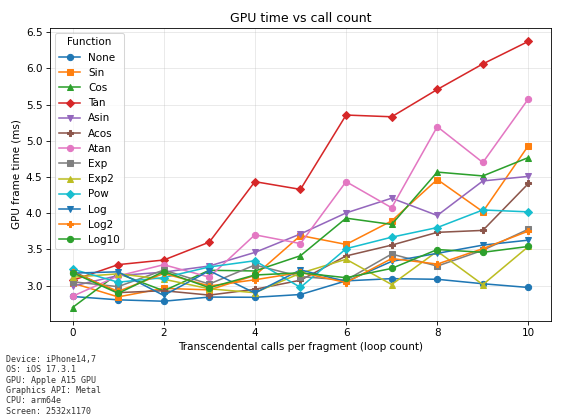
tan has the highest cost, and atan has the second highest.
4.6.3. iPhoneX
4.6.4. Galaxy S9
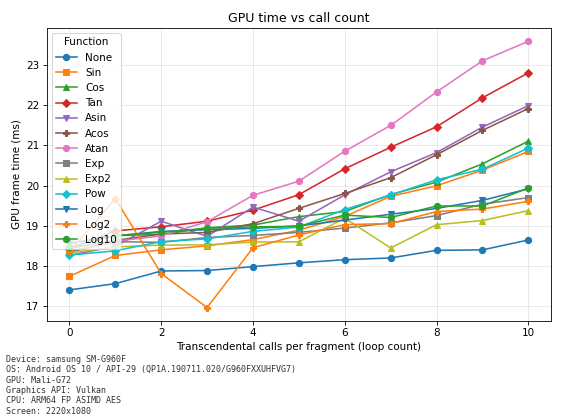
Atan appears to have the highest cost.
4.6.5. Summary
| Device | Notes |
|---|---|
| iPhone 15 Pro | tan is the heaviest when the execution count is less than 7; atan is the heaviest when it is 7 or more |
| iPhone 14 | tan is the heaviest |
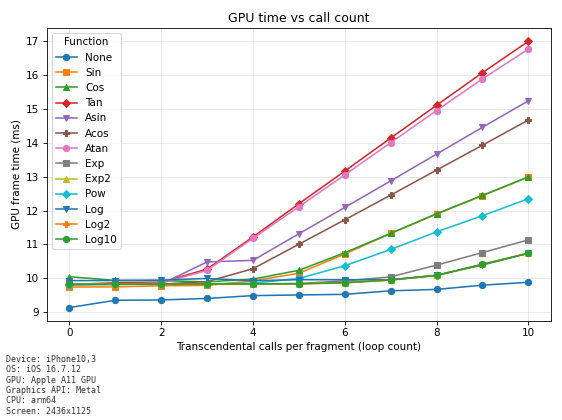
| iPhone X | tan is the heaviest |
| Galaxy S9 | atan is the heaviest |
4.7. Load of the sin Function
We measure the cost of the sin function, a representative transcendental function.
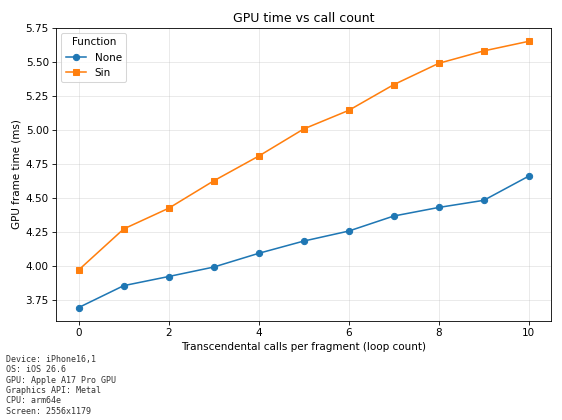
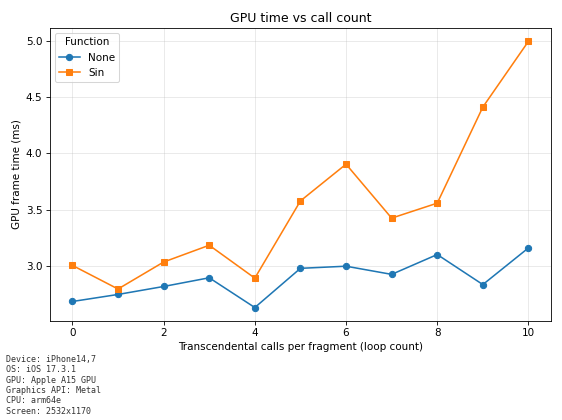
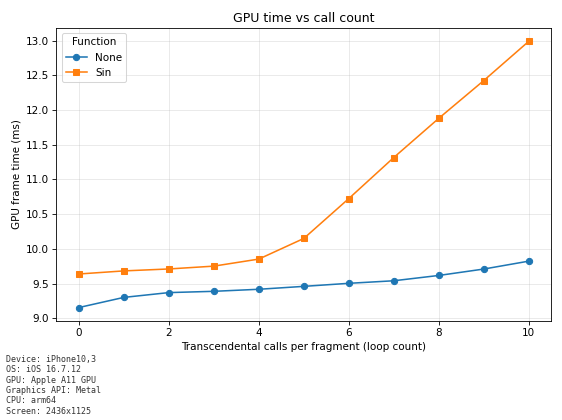
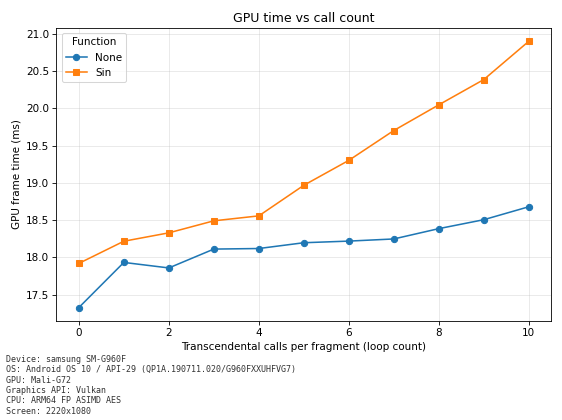
For each loop count from 0 to 10, we measure the GPU time required for the processing within a frame. At each measurement point, we measured for 10 seconds and summarized the GPU time in graphs.
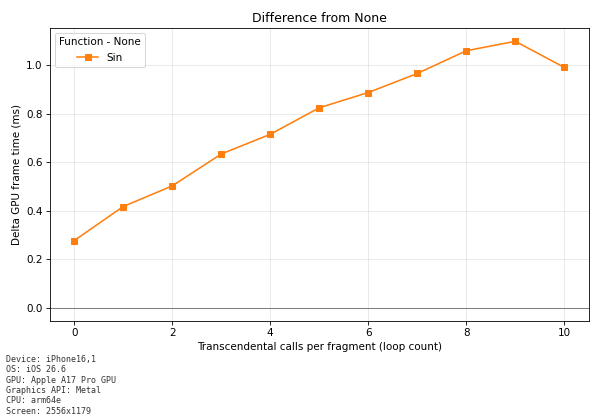
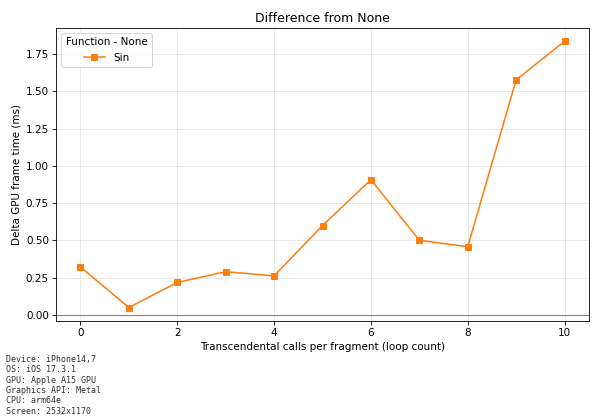
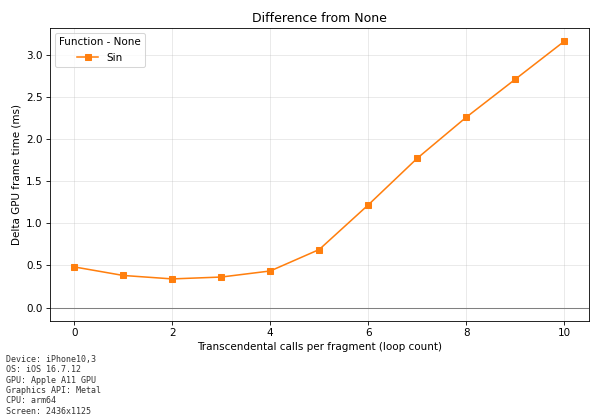
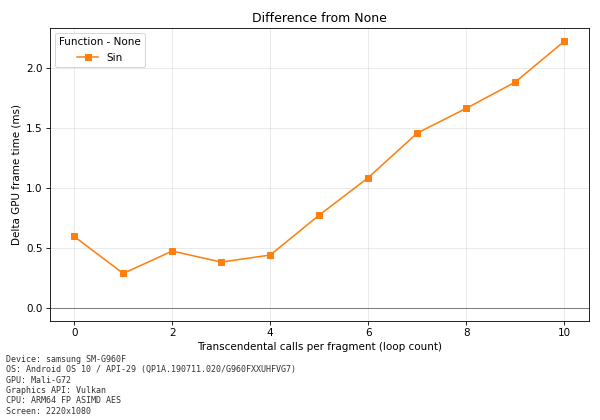
First graph: GPU time for each loop count Second graph: the difference between the GPU time for each loop count and None.
FrameTimingManager was used for the measurement.
4.7.1. iPhone15 Pro
The presence of a sin instruction in the shader increased the time by about 0.25ms. Each additional sin call increases the processing load by about 0.1ms.
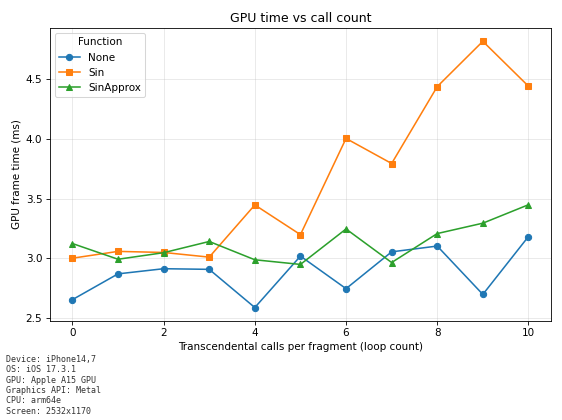
4.7.2. iPhone14
The presence of a sin instruction in the shader increased the GPU time by about 0.25ms. Each additional sin call increases the processing load by about 0.1 to 0.2ms.
4.7.3. iPhoneX
The presence of a sin instruction in the shader increased the time by about 0.5ms. With up to 4 sin calls, almost no increase in GPU time is observed, but beyond 5 calls, each additional sin call increases the processing load by about 0.6ms.
4.7.4. Galaxy S9
The presence of a sin instruction in the shader increased the time by about 0.5ms. With up to 4 sin calls, almost no increase in GPU time is observed, Beyond 5 calls, each additional sin call increases the processing load by about 0.2 to 0.3ms.
4.7.5. Summary of the sin Function Load
| Device | GPU load increase from the sin function | Notes |
|---|---|---|
| iPhone 15 Pro | +0.25ms (baseline) | About 0.1ms increase per call |
| iPhone 14 | +0.25ms (baseline) | About 0.1 to 0.2ms increase per call |
| iPhone X | +0.5ms (baseline) | About 0.6ms increase per call beyond 5 calls |
| Galaxy S9 | +0.5ms (baseline) | About 0.2 to 0.3ms increase per call beyond 5 calls |
Note: The "baseline" in the table refers to the initial load increase when a sin function exists in the shader.
When the number of sin functions in the shader increases, an increase in GPU time was observed even without executing the sin functions. This is considered to be an increase in load caused by register pressure.
4.8. Parabolic Approximation of the sin Function
A known technique approximates sin by using the following polynomial.
float sinApprox = (4.0 / PI) * x - (4.0 / (PI * PI)) * x * abs(x);
It can be computed with only multiplications and the absolute value abs(), so it is very lightweight.
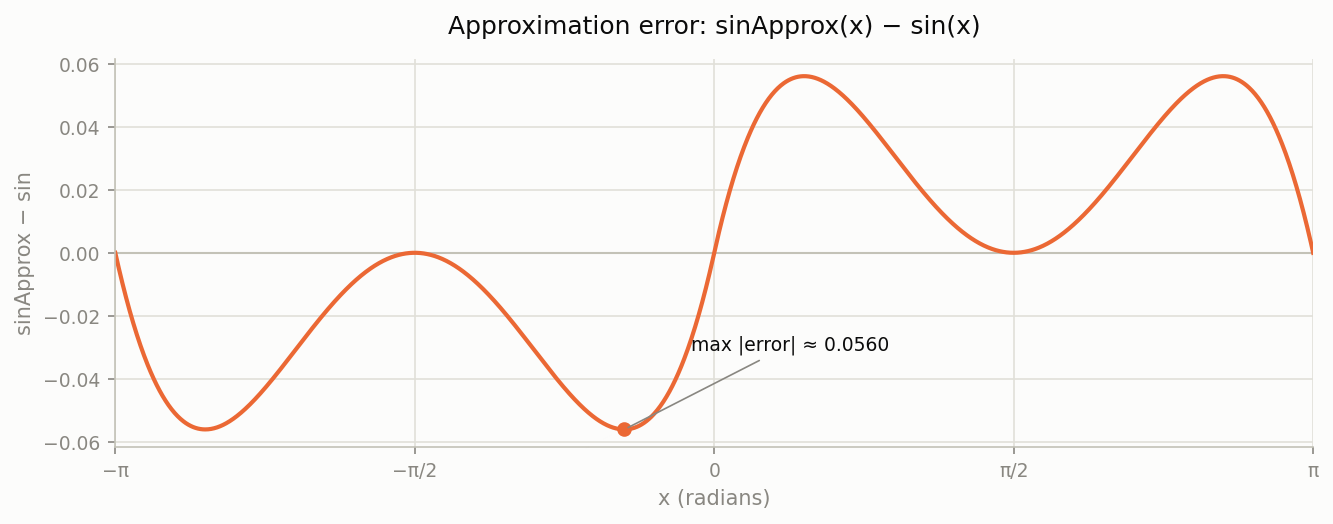
The parabolic approximation of sin outputs values very close to sin (-PI<=x<=PI)
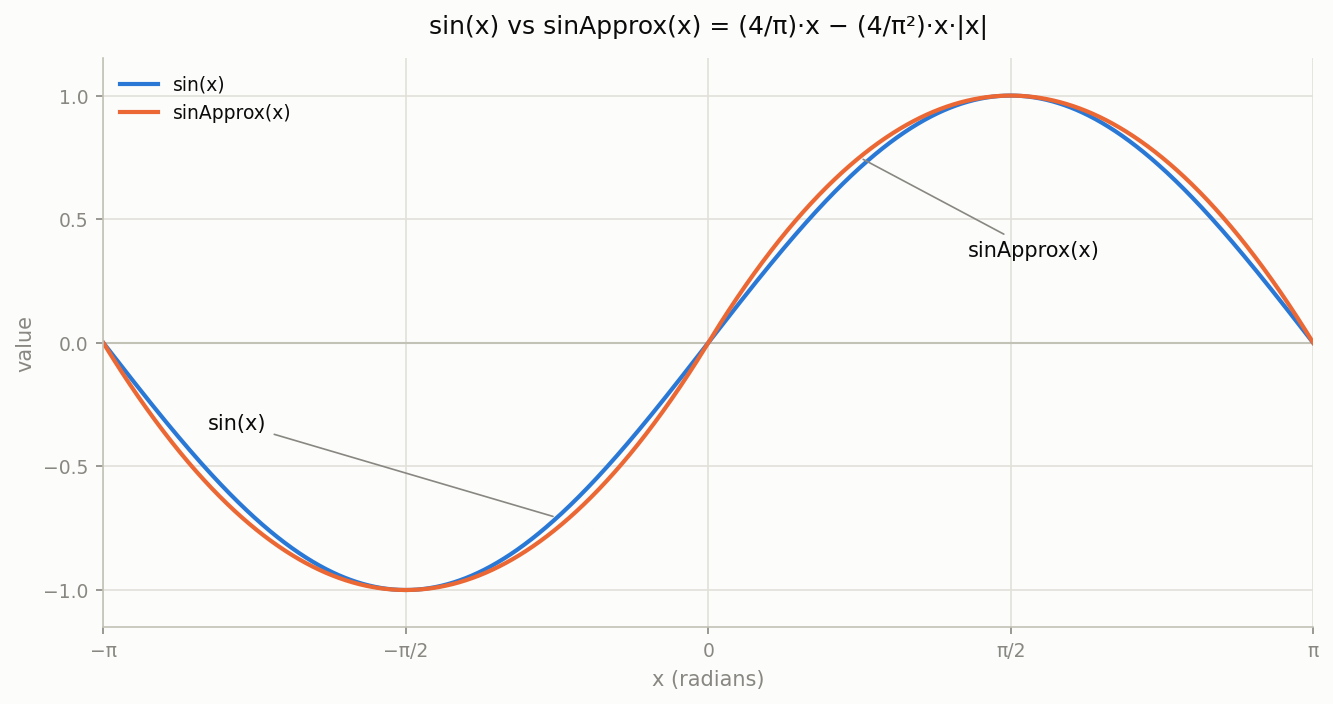
The maximum error is about 0.056.
4.9. Measuring the Load of the sin Approximation
We measured the load of sinApprox, the parabolic approximation of sin, and summarized it in graphs.
4.9.1. iPhone15 Pro
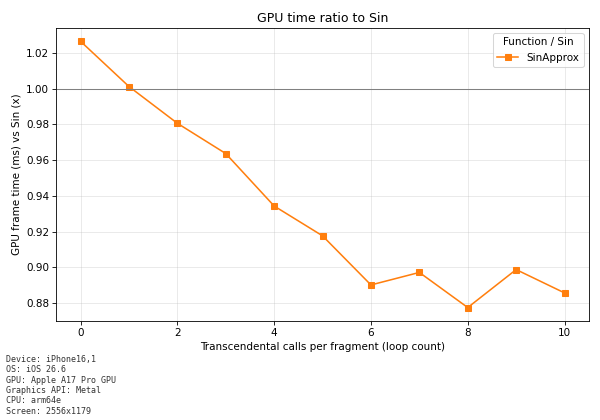
It is confirmed that the cost is lower than that of the sin function.
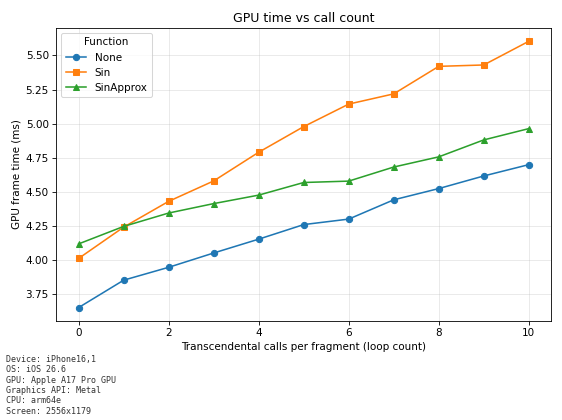
Comparison of the sin Function and the Approximation
When the function is executed 10 times, the cost is about 0.6 ms lower.
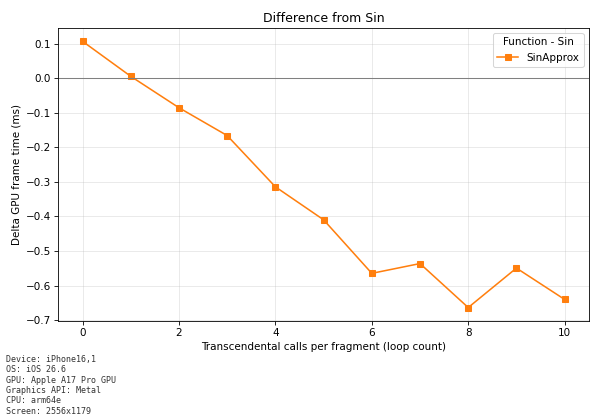
When the function was executed 10 times, the load of sinApprox was about 90% of that of sin.
4.9.2. iPhone14
Comparison of the sin Function and the Approximation
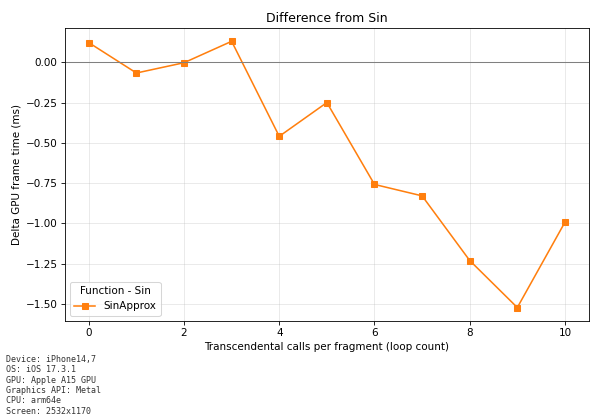
When the function is executed 10 times, the GPU time is about 1 ms shorter.
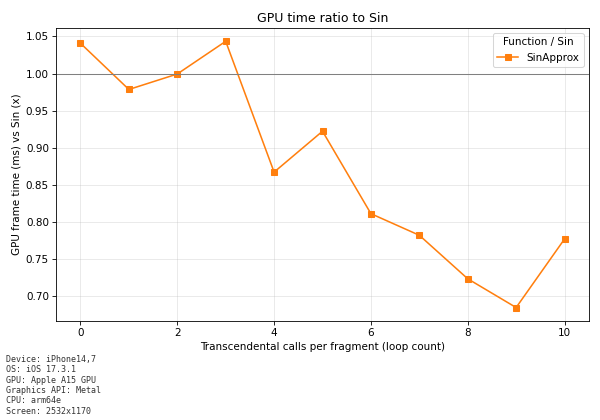
The cost of executing sinApprox 10 times was about 80% of that of sin.
4.9.3. iPhoneX
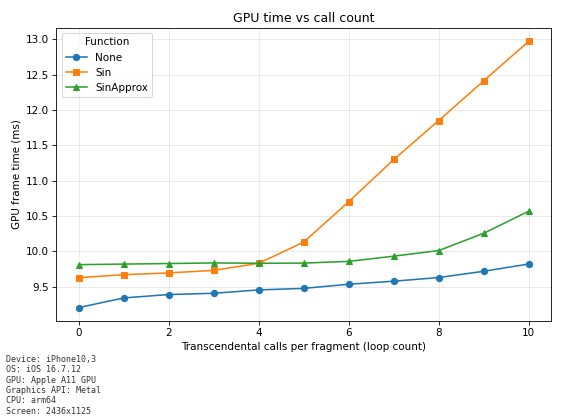
Comparison of the sin Function and the Approximation
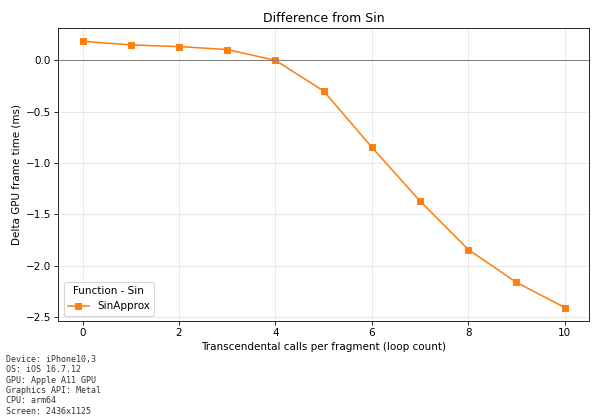
The cost of executing sinApprox 10 times was about 2.5 ms shorter than that of executing sin.
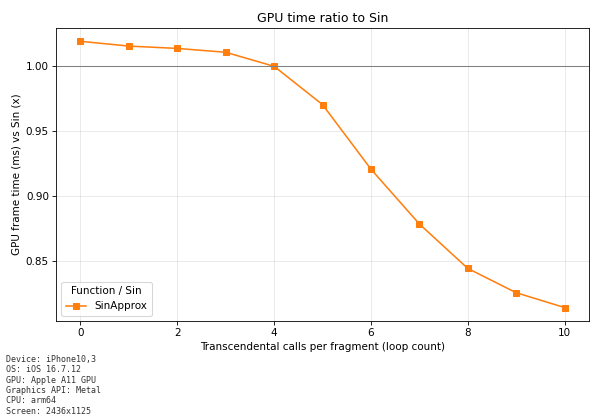
The GPU time of executing sinApprox 10 times was about 80% of that of sin.
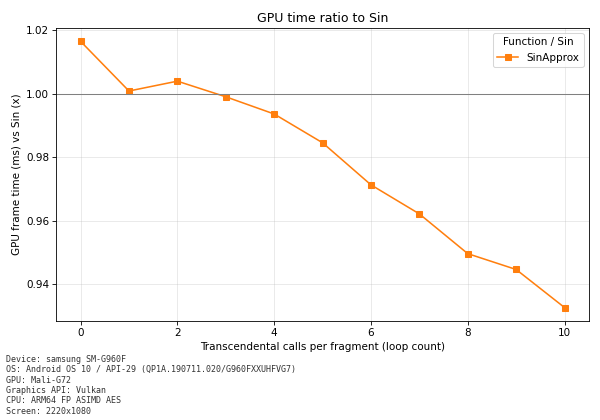
4.9.4. Galaxy S9
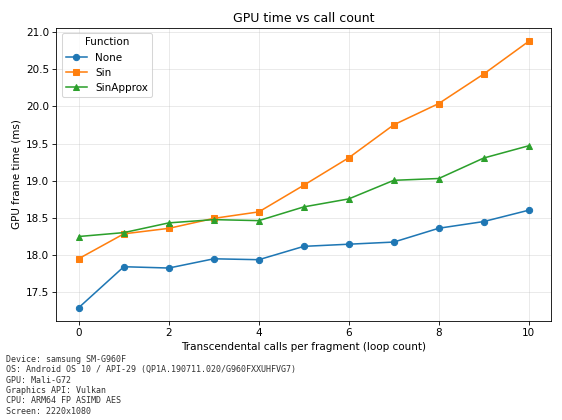
Comparison of the sin Function and the Approximation
When the function is executed 10 times, the GPU time is about 1.3 ms shorter.
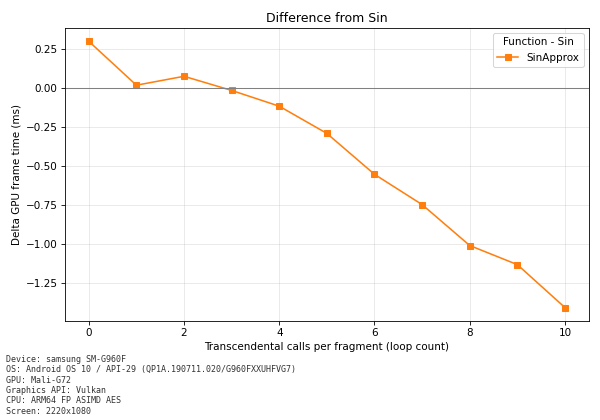
The cost of executing sinApprox 10 times was about 94% of that of sin.
4.9.5. Summary of the sin Approximation Load
The GPU reduction achieved by sinApprox is summarized in the following table.
| Device | Load of the sin function | Reduction from sinApprox | Notes |
|---|---|---|---|
| iPhone 15 Pro | Baseline | About 0.6ms reduction | The load of sinApprox is about 90% of sin |
| iPhone 14 | Baseline | About 1.0ms reduction | The load of sinApprox is about 80% of sin |
| iPhone X | Baseline | About 2.5ms reduction | The load of sinApprox is about 80% of sin |
| Galaxy S9 | Baseline | About 1.3ms reduction | The load of sinApprox is about 94% of sin |
Note: The reduction is the difference in GPU time at a loop count of 10.
4.10. Load of the tan Function
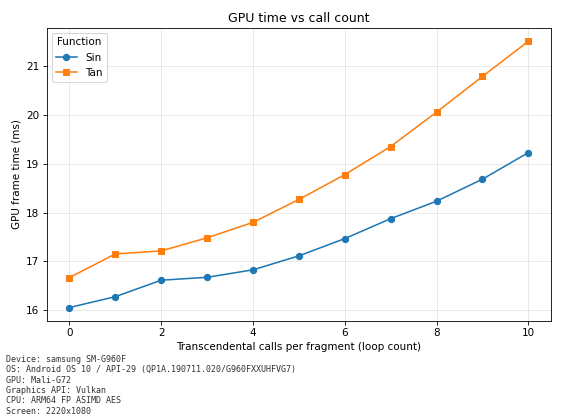
We also measured the load of the tan function. The tan function calls division internally, so its cost is higher than that of the sin and cos functions.
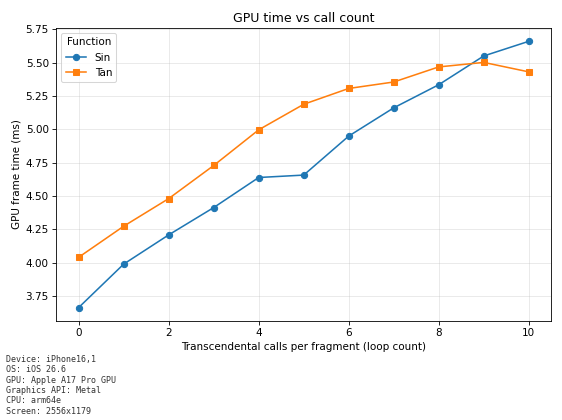
4.10.1. iPhone15Pro
It is more expensive than the sin function, but when the number of executions exceeds 9, the sin function became more expensive.
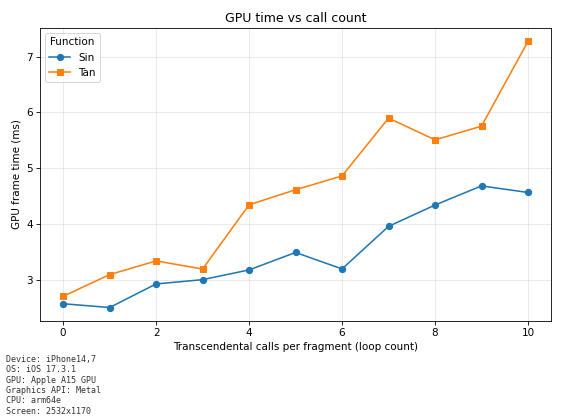
4.10.2. iPhone14
The tan function had a higher load than the sin function.
4.10.3. iPhoneX
The tan function had a higher load than the sin function.
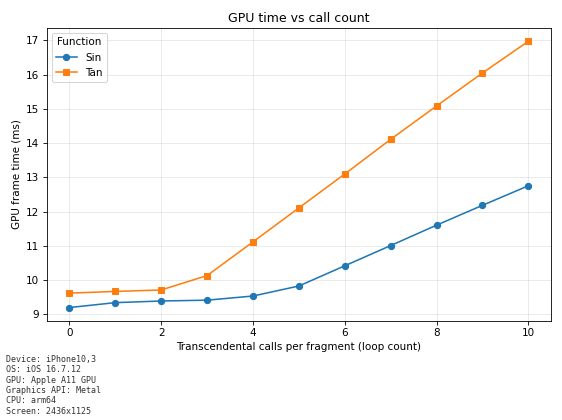
4.10.4. Galaxy S9
The tan function had a higher load than the sin function.
4.11. Approximating the tan Function
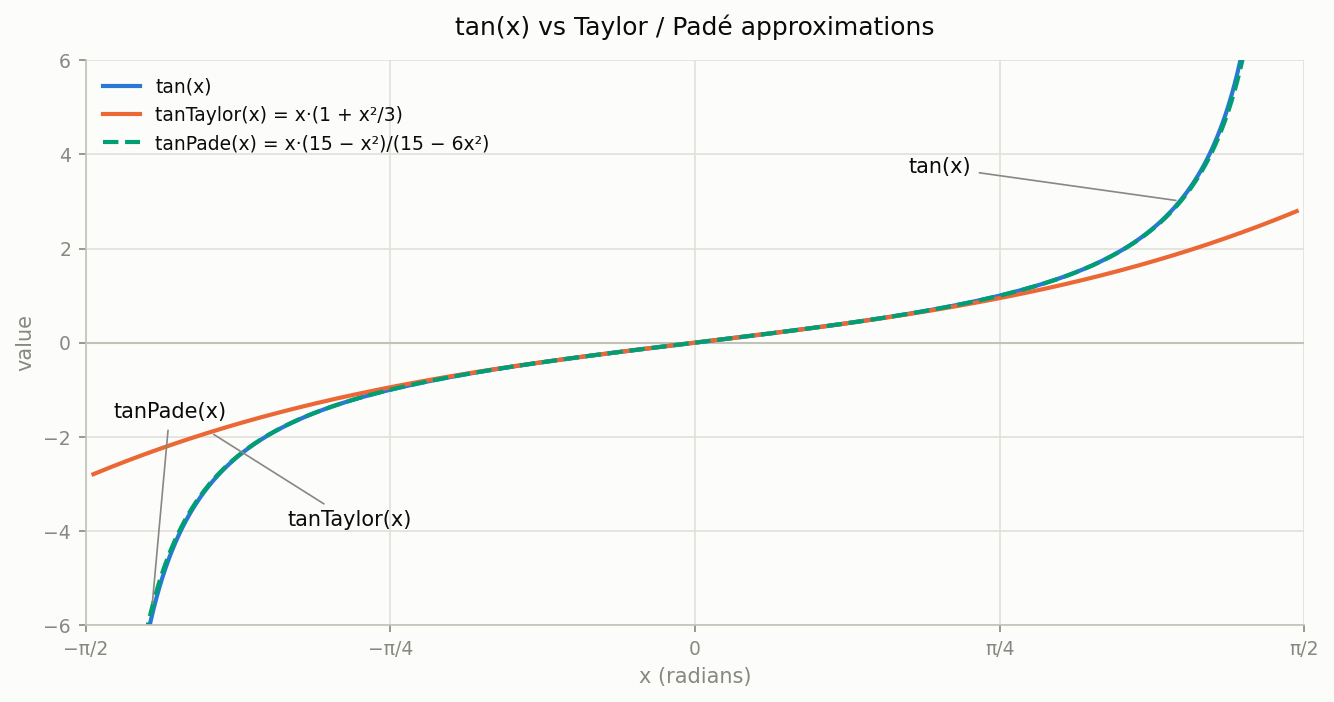
Techniques for approximating the tan function include using the Taylor expansion as is and using the Padé approximation. The Taylor expansion has a lower load but also lower accuracy. The Padé approximation is more accurate but also has a higher load.
4.11.1. Technique 1. Approximation with the Taylor Expansion
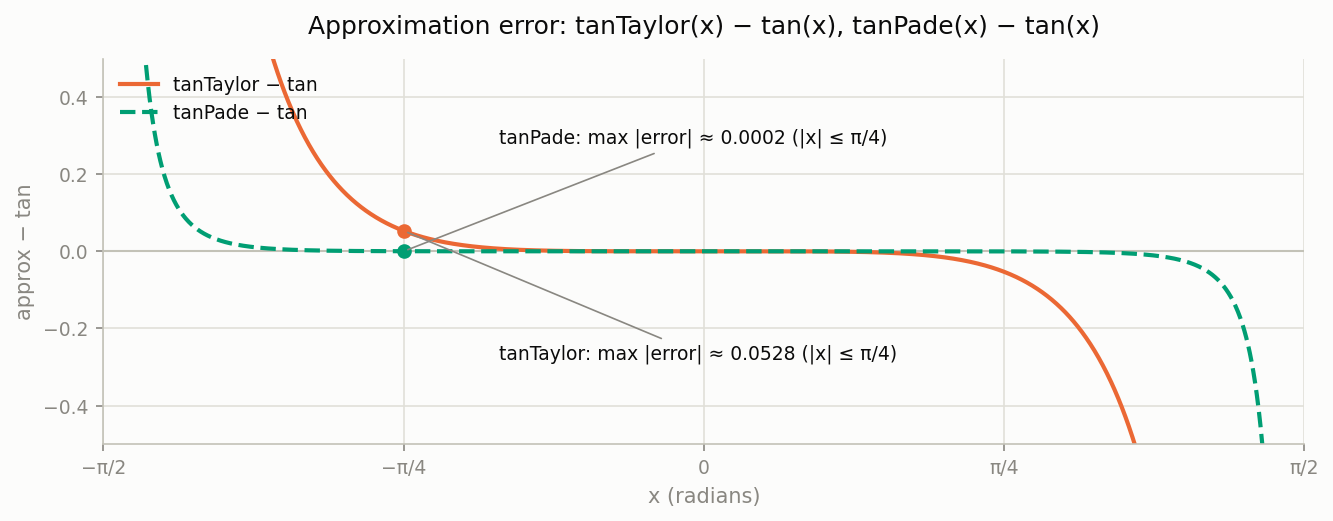
This is an approximation that uses the Taylor expansion of tan. The closer |x| gets to PI/2, the larger the error becomes.
float tanTaylor(float x) {
    float x2 = x * x;
    return x * (1.0 + x2 * 0.3333333);
}
4.11.2. Technique 2. Padé Approximation
This is a method that uses the Padé approximation of tan. In the range |x| < PI/4, it outputs values very close to tan(x).
float tanPade(float x) {
    float x2 = x * x;
    return x * (15.0 - x2) / (15.0 - 6.0 * x2);
}
4.12. Graph of the tan Function Approximations
We plotted the introduced tanTaylor and tanPade on a graph.
Error Relative to the tan Function
4.13. Measuring the Load of the tan Function Approximations
We measured the load of the approximations of the tan function.
4.13.1. iPhone15 Pro
When the execution count is small, the overhead from register pressure stands out, but as the execution count grows, the approximations keep the load lower.
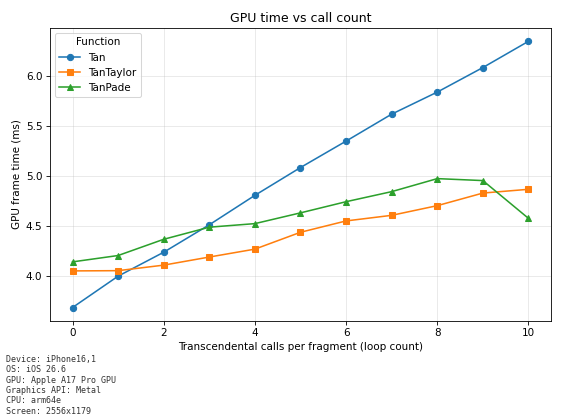
Comparison of the tan Function and the Approximations
When the function is executed 10 times, the GPU time of the approximation was about 80% of that of the tan function.
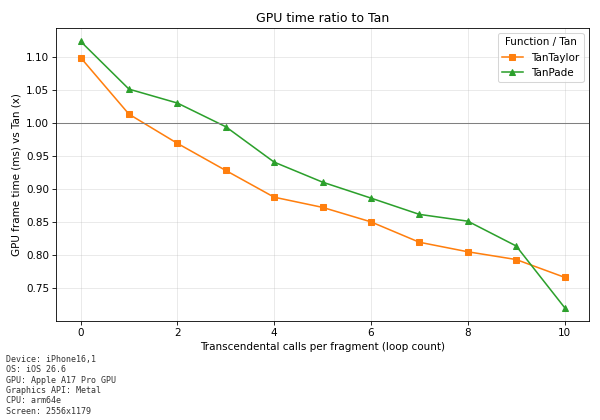
When executed 10 times, the approximation's processing time was about 1 ms shorter.
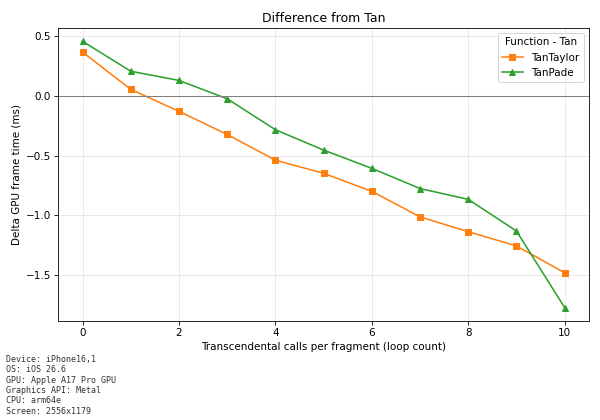
4.13.2. iPhone14
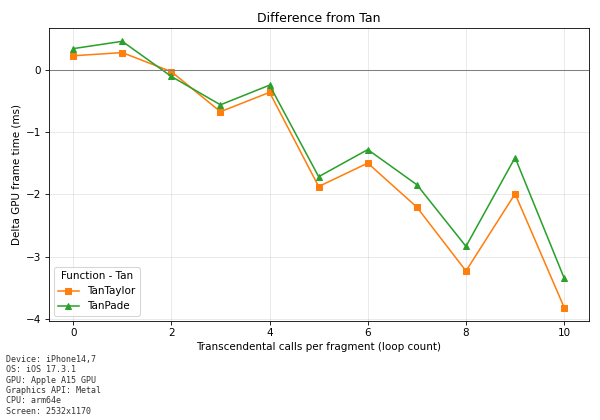
When the execution count is small, a slight overhead from register pressure is observed. but as the execution count grows, the approximations keep the load lower.
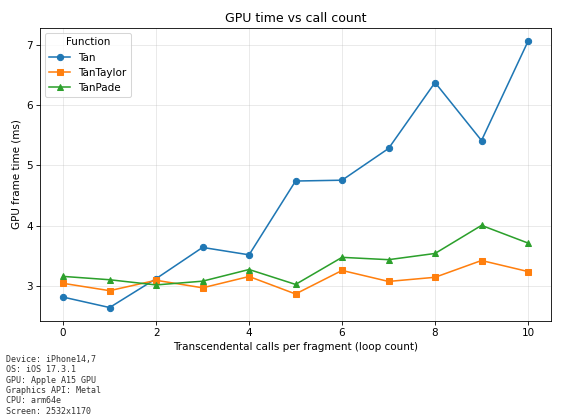
Comparison of the tan Function and the Approximations (iPhone14)
When the function is executed 10 times, the GPU time of the approximation was about 50% of that of the tan function.
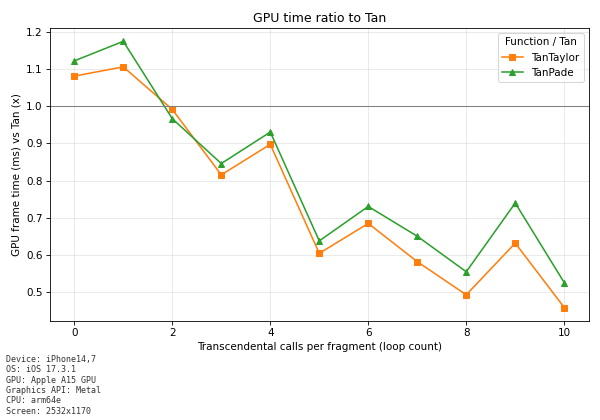
When executed 10 times, the approximation's processing time was about 3 ms shorter.
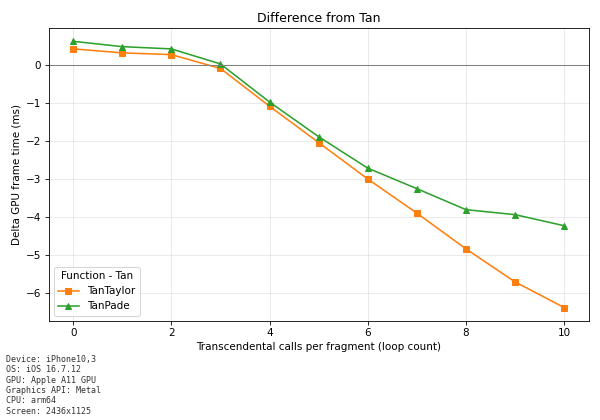
4.13.3. iPhoneX
When the execution count is small, a slight overhead from register pressure is observed. but as the execution count grows, the approximations keep the load lower. With the Taylor expansion, there is almost no increase in processing load, The Padé approximation slightly increases the processing cost.
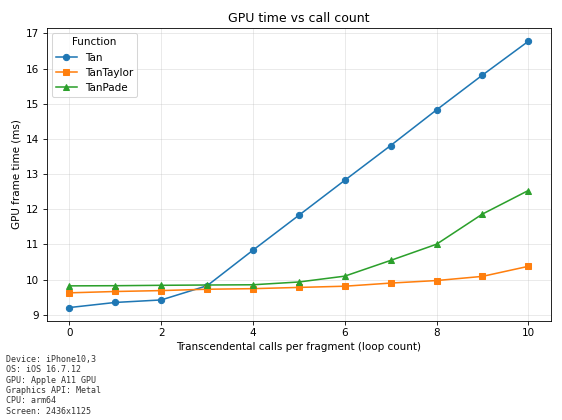
Comparison of the tan Function and the Approximations
When the function is executed 10 times, the GPU time of the Taylor expansion was about 60% of that of the tan function. The Padé approximation was about 75% of the GPU time.
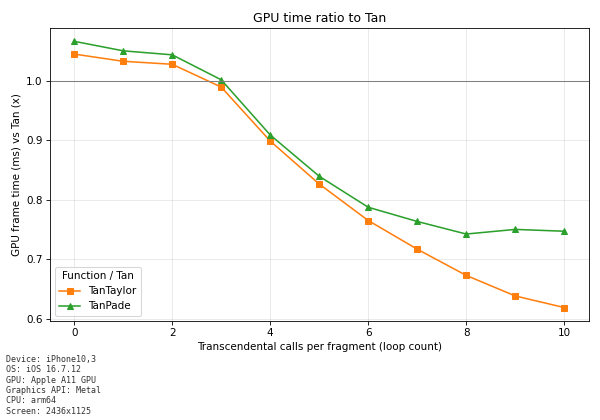
When the function was executed 10 times, the Taylor expansion was about 6ms shorter and the Padé approximation was about 4ms shorter.
4.13.4. Galaxy S9
When the execution count is small, a slight overhead from register pressure is observed. but as the execution count grows, the approximations keep the load lower.
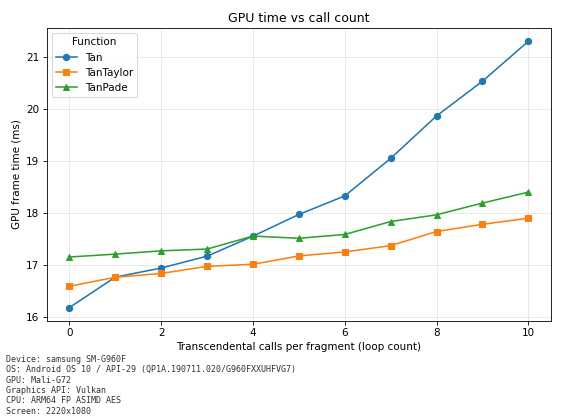
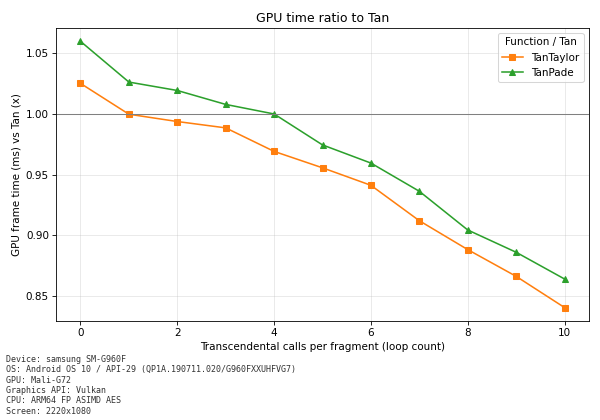
Comparison of the tan Function and the Approximations
When the function is executed 10 times, the GPU time of the approximation was about 85% of that of the tan function.
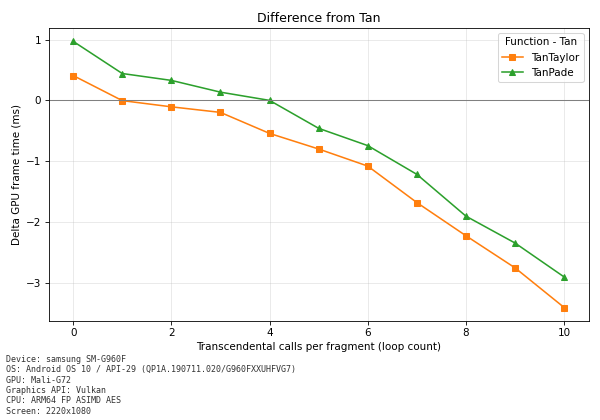
When the function was executed 10 times, the Taylor expansion was about 3ms shorter.
4.13.5. Summary of the tan Function Approximation Load
| Device | GPU load trend | Notes |
|---|---|---|
| iPhone 15 Pro | The approximation is about 20% lower | The approximation reduces processing time by about 1ms |
| iPhone 14 | The approximation is about 50% lower | The approximation reduces processing time by about 3ms |
| iPhone X | The approximation is about 25 to 40% lower | The Taylor expansion reduces it by about 6ms and the Padé approximation by about 4ms |
| Galaxy S9 | The approximation is about 15% lower | The approximation reduces processing time by about 3ms |
Note: "GPU load trend" is the approximate reduction rate of the GPU time when running an approximation (the Taylor expansion or the Padé approximation), compared with the standard tan function.