Chapter 3. Reducing Bone Animation Load with VAT
3.1. Introduction
In typical bone animation in Unity, the CPU performs playback calculations such as bone updates every frame. As a result, CPU load accumulates as the number of animated objects increases, which causes the frame rate to drop. This chapter introduces VAT, a technique that reduces this load by replacing these runtime calculations entirely with precomputation.
3.2. What Is VAT
VAT stands for Vertex Animation Texture. It is a technique that bakes the vertex deformation data of an animation into a texture in advance and plays it back by reading the texture in the vertex shader. Each pixel of the texture corresponds to "the position of a certain vertex at a certain frame," and shifting the read location according to the playback time makes the mesh appear to move (Figure 3.1). To preserve precision, positions are stored as values normalized from 0 to 1 and are restored to actual coordinates in the vertex shader.
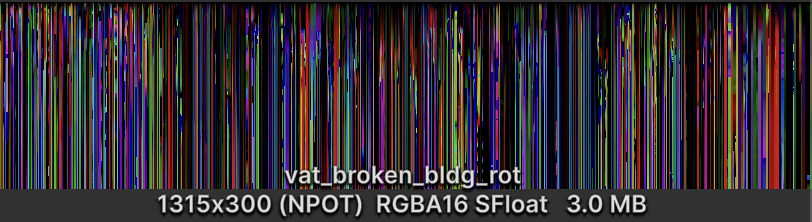
Figure 3.1: How a VAT texture works. The horizontal axis corresponds to vertices and the vertical axis to frames
With VAT, runtime playback calculations such as bone updates can be replaced entirely with precomputation. This is an efficiency gain that even GPU Skinning cannot achieve.
On the other hand, VAT has the following drawbacks.
- Dedicated assets for VAT must be prepared
- The texture size grows with the number of vertices and frames
- Because exact values are required, VAT does not work well with texture compression and is effectively handled uncompressed
- Because the motion is fixed once baked into the texture, some control is possible with ingenuity, but VAT is not suited to fine-grained control
Given these characteristics, VAT is particularly effective when a large number of objects play a predetermined animation. It suits effects that do not require individual control, such as building destruction, crowds, and background decorations (Figure 3.2).
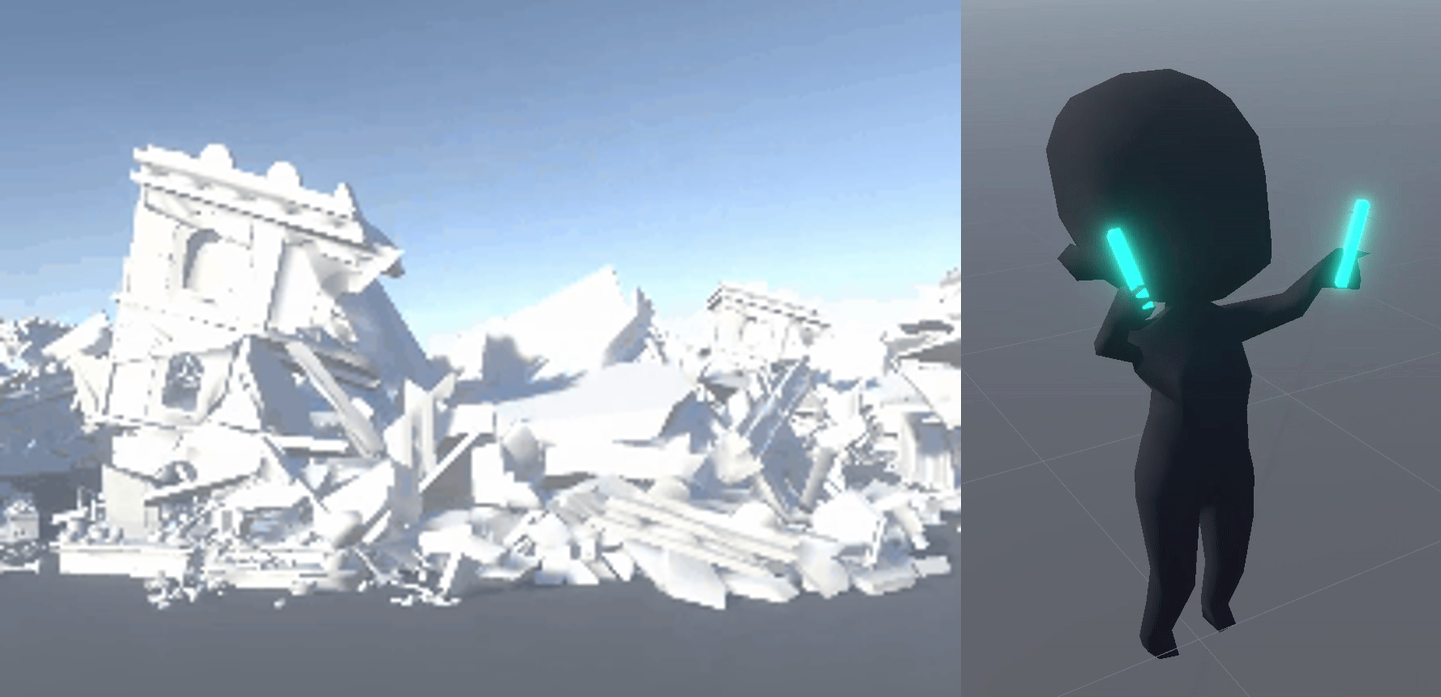
Figure 3.2: Animation with VAT (left: rigid body, right: soft body)
3.3. Performance Verification
This section presents the results of comparing the performance of VAT with other animation methods on a physical device.
3.3.1. Measurement Environment and Comparison Conditions
The measurement environment is shown in Table 3.1.
Table 3.1: Measurement environment
| Item | Details |
|---|---|
| Physical device | Pixel 8a (GPU: Mali-G715) |
| Graphics API | Vulkan |
| Unity version | 6000.3.2f1 |
| Measurement APIs | FrameTimingManager, ProfilerRecorder |
| Model | Building collapse animation (85,209 vertices, 1,315 fragments) |
| Animation | 300 frames |
| Measurement method | Object count varied from 0 to 16; median of 3 runs of 300 frames per condition |
The three methods compared are shown in Table 3.2.
Table 3.2: Comparison conditions
| Method | Configuration | Optimization enabled |
|---|---|---|
| FBX method | Each fragment is placed as an individual Mesh Renderer and played back with an Animator | SRP Batcher |
| Skin method | One bone per fragment, merged into a single SkinnedMeshRenderer and played back with an Animator | SRP Batcher |
| VAT method | Motion of all fragments is baked into a texture and rendered as a single mesh (Rigid-Body Dynamics mode) | GPU Instancing |
The FBX method has each fragment as an individual Mesh Renderer and plays it back with an Animator (the fragments are rigid bodies moved by Transform, and skinning is not used). The Skin method assigns one bone to each fragment and combines everything into a single Skinned Mesh. The 1,315 fragments become 1,315 bones as they are, and there is one Renderer. Animation playback is handled by the Animator on the CPU, and vertex deformation is performed by GPU Skinning. The VAT method bakes the motion of all fragments into a texture and renders them as a single mesh. The appearance is identical across all three methods.
For the draw optimization settings, each method is compared with the setting that favors it enabled. Because SkinnedMeshRenderer does not support GPU Instancing, the best option available for the Skin method is the SRP Batcher. Note that converting to bones for the Skin method also requires a dedicated conversion pipeline, which is the same condition as for VAT.
3.3.2. CPU Time
The CPU time (main thread) measurement results are shown in Figure 3.3. With 16 objects displayed, the FBX method grows to 154.3 ms, while the Skin method (16.5 ms) and the VAT method (12.6 ms) remain nearly flat.
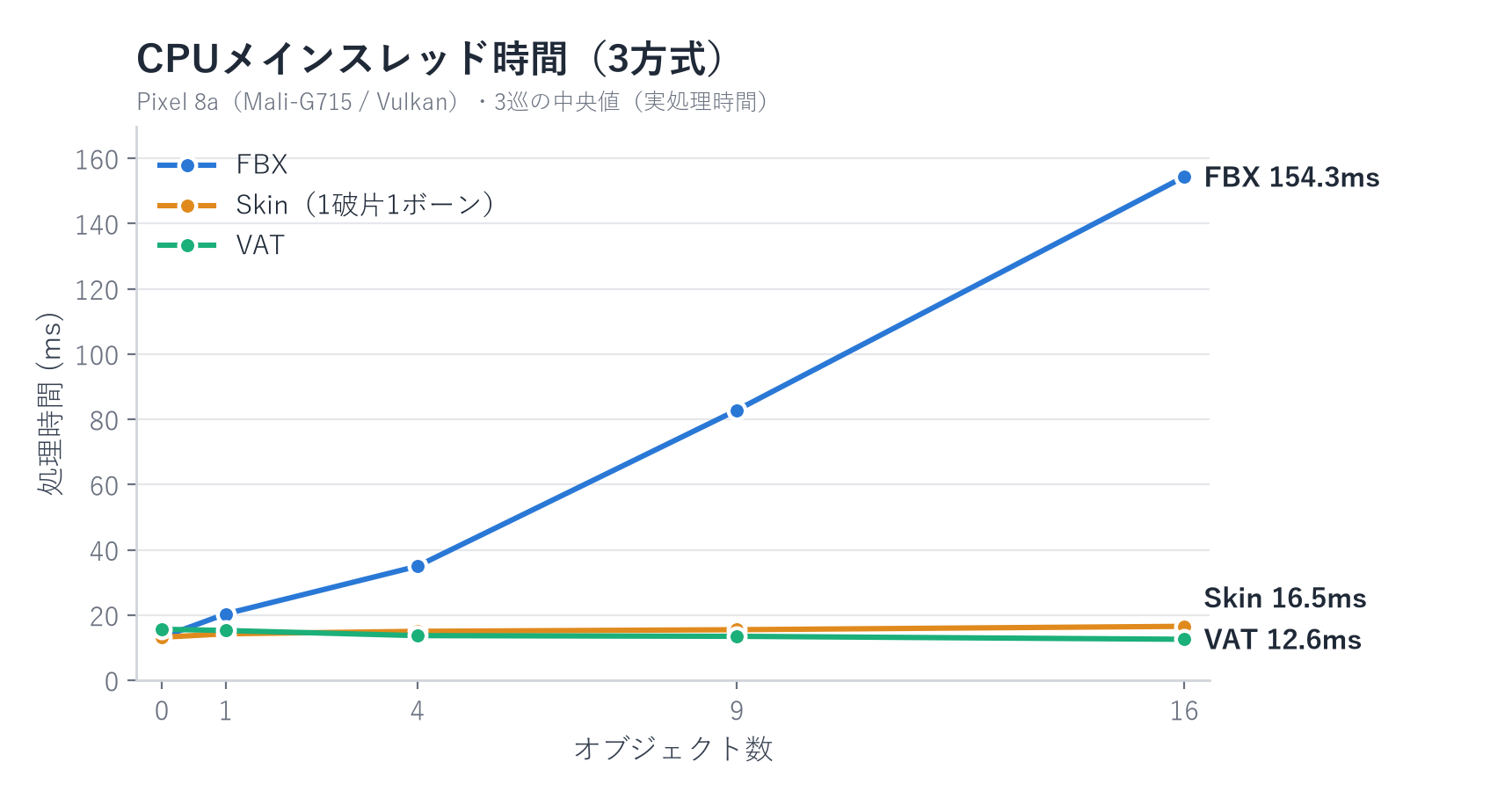
Figure 3.3: CPU main thread time by object count
The breakdown is shown in Table 3.3. The largest factor behind the difference between the FBX method and the other two is the draw call submission process. In the FBX method, 1,315 fragments per model become draw targets, whereas in the two methods that combine them into a single mesh, this processing nearly disappears. The same applies to per-fragment bounding box calculation and culling. On the other hand, the difference between the Skin method and the VAT method is the Animator update. In the Skin method, the CPU handles playback, so 4.5 ms remains at 16 objects, whereas in the VAT method the playback itself moves to the GPU, so it disappears entirely. This difference widens as the number of objects increases.
Table 3.3: Breakdown of CPU time with 16 objects displayed (ms)
| Process | FBX method | Skin method | VAT method |
|---|---|---|---|
| Main thread total | 154.30 | 16.53 | 12.56 |
| of which draw call submission (SRPBatcher.Flush) | 76.17 | 0.03 | 0.02 |
| of which Animator update | 5.30 | 4.54 | 0.02 |
3.3.3. GPU Time
The GPU time measurement results are shown in Figure 3.4. With 16 objects, the FBX method takes 77.1 ms, while the Skin method is the fastest at 22.2 ms and the VAT method takes 32.5 ms.
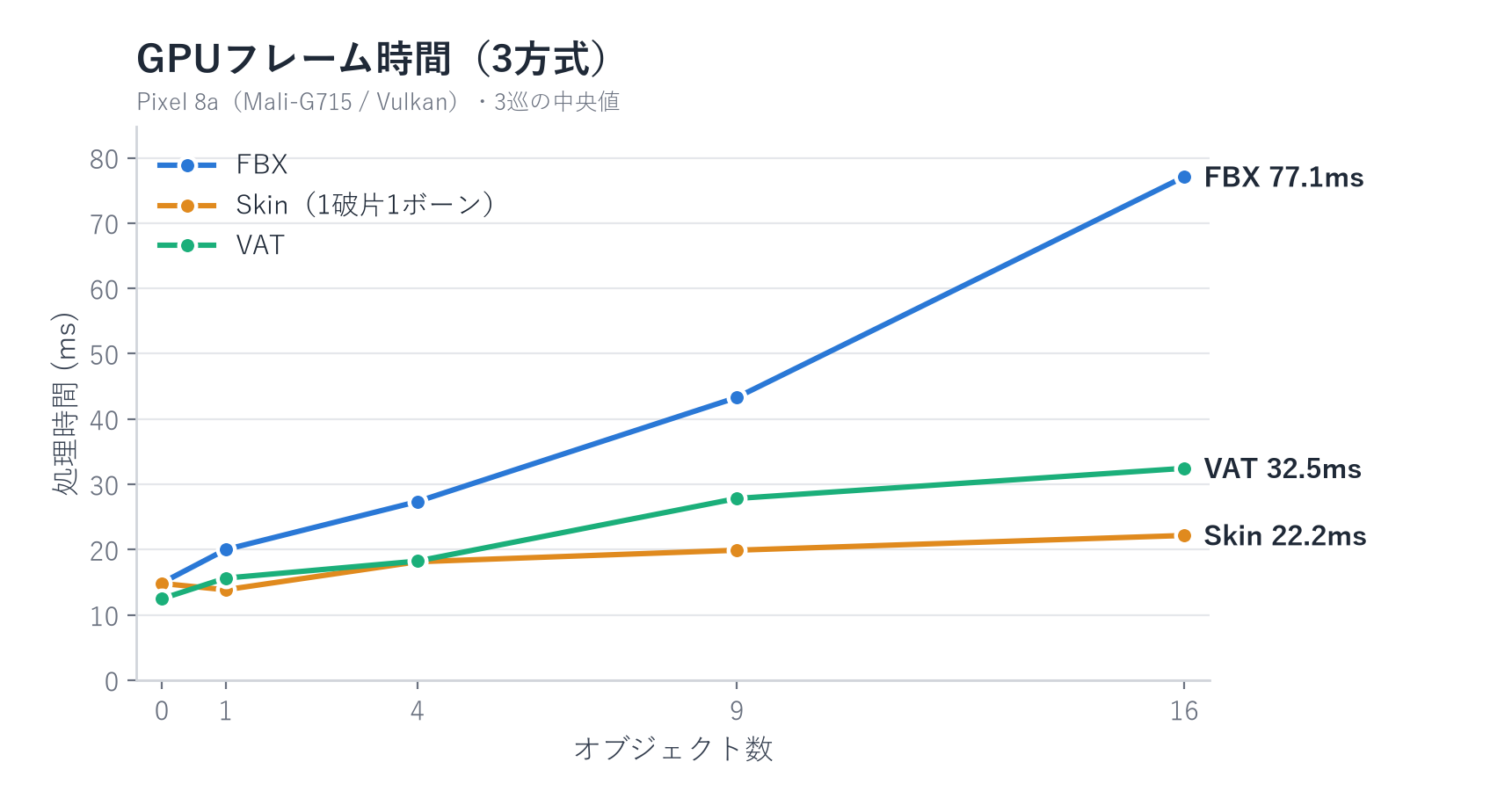
Figure 3.4: GPU time by object count
The main cause of the difference between the FBX method and the other two is the number of split draw commands. In the FBX method, each fragment issues its own draw commands in every render pass, reaching about 210,000 per frame, whereas the VAT method consolidates them into instanced draws, resulting in 99. The Skin method also stays at a similar level because there is one Renderer per object. Each draw command carries a fixed cost, so the difference in the number of splits appears directly as a difference in processing time.
The difference between the Skin method and the VAT method comes from the number of deformation calculations. GPU Skinning calculates the deformation only once per frame, and all render passes such as shadow and depth reuse the result. VAT, in contrast, redoes the deformation from the texture in the vertex shader for every pass. The environment in this test has a scene configuration with many passes, using four shadow cascades, so the gap with the Skin method widened accordingly (shadow map rendering: 44.3 ms for the FBX method, 7.4 ms for the Skin method, 16.0 ms for the VAT method). In configurations with fewer passes that perform vertex calculations, this gap narrows.
3.3.4. GPU Memory Allocation
The GPU memory measurement results are shown in Figure 3.5. The values are measured figures for the graphics driver as accounted by the OS (GL mtrack). The increase from 0 to 16 objects is +411.8 MB for the FBX method (about 26 MB per object), +38.2 MB for the Skin method (about 2.4 MB per object), and almost ±0 for the VAT method.
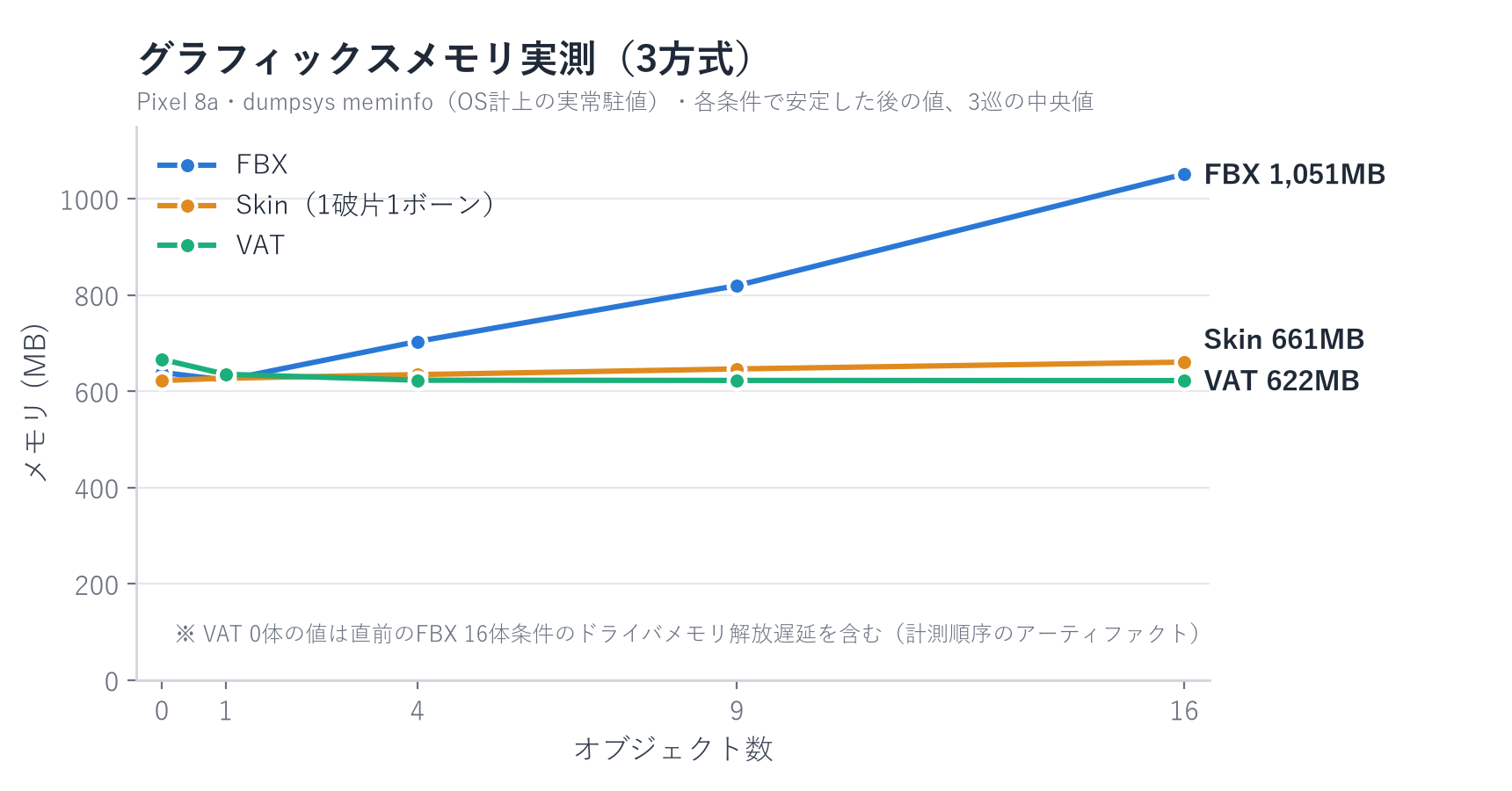
Figure 3.5: GPU memory allocation by object count
This difference stems from the structural difference in what increases when one object is added. In the FBX method, rendering data such as matrices is allocated in GPU memory for every fragment. In the Skin method, what increases is only one vertex buffer per object, which receives the skinning deformation results. The VAT method computes the deformation on the fly and holds no new buffers, so nothing increases. Note that the VAT texture is about 6.6 MB uncompressed, which is sufficiently small compared with the differences in the increases.
3.3.5. Summary of Verification Results
The measured values with 16 objects displayed are summarized in Table 3.4.
Table 3.4: Summary of measured values with 16 objects displayed
| Metric | FBX method | Skin method | VAT method |
|---|---|---|---|
| CPU main thread (ms) | 154.3 | 16.5 | 12.6 |
| GPU frame (ms) | 77.1 | 22.2 | 32.5 |
| Draw commands (per frame) | about 210,000 | Same level as the VAT method | 99 |
| GPU memory increase (0 to 16 objects, MB) | +411.8 | +38.2 | almost ±0 |
Compared with the FBX method, both the Skin method and the VAT method are significantly better on all metrics. The reason comes down to "being handled as a single mesh."
The comparison between the Skin method and the VAT method shows trade-offs: the Skin method is better in GPU time, and the VAT method is better in CPU main thread time and memory. The GPU time of the VAT method depends heavily on whether the pass configuration involves a lot of vertex deformation processing. Therefore, VAT is the first candidate for configurations with few passes that perform vertex calculations, or when the goal is to reduce CPU load.
Note that this comparison used rigid-body destruction, a subject that is easy to express with bones. For models that would require many bones or fall back to approximation, such as cloth or human bodies, and for cases with many objects, the CPU load becomes pronounced, so VAT is considered to have an even greater advantage.
3.4. Creating VAT Assets
An easy way to create VAT assets is to use the Labs Vertex Animation Textures ROP (hereafter, VAT ROP) that comes with Houdini*1. Houdini is a DCC tool from SideFX that excels at procedural generation. VAT ROP provides presets and compatible shaders for Unity, and it accepts not only simulation results inside Houdini but also FBX animations created in other DCC tools as input.
VAT ROP has the four modes shown in Table 3.5.
Table 3.5: VAT ROP modes
| Mode | Use |
|---|---|
| Soft-Body Deformation | Basic vertex deformation. Requires that the topology does not change |
| Rigid-Body Dynamics | Optimized for rigid-body destruction. Because motion is recorded per fragment, the texture size can be kept small |
| Dynamic Remeshing | Supports things whose topology changes, such as liquids and tearing cloth |
| Particle Sprites | For particle simulation |
The procedure is simply to specify the node of the animation to convert to VAT in Input Geometry, the mode to use in Mode, and Unity in Target Engine, and then press the Render All button. The assets in Table 3.6 are output at once.
Table 3.6: Assets required for VAT playback
| Asset | Role |
|---|---|
| Position texture | Position of each vertex at each frame (normalized to 0 to 1) |
| Rotation texture | Orientation of the deformed faces. Normals and tangents are reconstructed from it to preserve shading |
| Vertex color texture | Destination for baking Houdini-side attributes. A free slot that can be used, for example, to improve interpolation quality |
| FBX | Mesh with identification numbers embedded in the UVs that indicate the texture reference positions |
| Material | Auxiliary data such as frame count, FPS, and bounding box already set |
| Shader | The main body of the playback calculation for each mode (installed separately) |
The shader is not included in the output files, because the calculation is fixed regardless of the animation. Install the SideFX Vertex Animation Textures package separately from Unity's Package Manager (its location can be checked in the Real-Time Shaders tab of VAT ROP). In addition to Shader Graphs supporting the four modes, the package includes documentation and Presets for import settings.
3.5. Notes on Adoption
With VAT, the animation breaks if precision is insufficient, so a format suitable for the texture must be specified. Likewise, there are recommended import settings for the FBX side. Follow the "VAT Import Settings Guide" included in the package and apply the dedicated import settings, including disabling texture compression.
Also, the official Shader Graph is positioned strictly as a template, and customization is necessary in practice. Rather than using the template directly, copy it for your project before use. However, the copied Shader Graph still references the Sub Shader Graph on the package side, so be sure to switch the references to the copied side.
Note that the import settings of the output files and the reference settings, such as assigning textures and shaders to materials, must be done manually and are prone to trouble caused by missed settings. In projects that mass-produce assets, there is room to automate import settings and reference resolution with a Scripted Importer or similar. For improvements in this area, see the materials uploaded to CEDiL*2.
3.6. Summary
VAT is a technique that bakes animation into a texture and plays it back on the GPU. Its defining feature is that it can greatly reduce draw calls, and compared with a configuration that has a Renderer per fragment, it was substantially more efficient, along with the Skin method. The two involve trade-offs: the Skin method is better in GPU time, and the VAT method is better in CPU time and memory. VAT is the first candidate for configurations with few passes that perform vertex calculations, or when the goal is to reduce CPU load. It has constraints such as the need to prepare dedicated assets and fixed motion, but it is a powerful option when a large number of objects play a predetermined animation.
[*1] A tool included in the SideFX Labs package. Version 3.0 was used for the verification in this chapter.