Chapter 2. When to Use UnsafePass in Render Graph
2.1. Introduction
In Unity 6, when you build a rendering pipeline with Render Graph, you choose among RasterRenderPass, ComputePass, and UnsafePass depending on the work. This chapter describes the situations in which UnsafePass should be used.
Render Graph provides optimizations such as dependency analysis and subpass merging. Therefore, the basic rule is to prefer RasterRenderPass for regular rendering and ComputePass for work that uses a compute shader.
UnsafePass should mainly be chosen in the following four situations.
- When the work cannot be done with RasterRenderPass or ComputePass
- When the CommandBuffer itself is required
- When you want to migrate quickly from Compatibility Mode to Render Graph
- When a single rendering operation consists of many passes that cannot be merged
The first three are cases where the work is impossible without UnsafePass or the implementation cost is high. The last one is not mandatory, but combining the passes into a single UnsafePass can be expected to reduce CPU load and make the Render Graph Viewer easier to read.
The following sections explain each of these situations in turn.
2.2. Situations Where UnsafePass Should Be Chosen
UnsafePass does not refer to the C# unsafe feature. It is a pass that suppresses part of the automatic management and validation done by Render Graph and exposes an API close to CommandBuffer.
2.2.1. When the work cannot be done with RasterRenderPass or ComputePass
RasterCommandBuffer and ComputeCommandBuffer, used by RasterRenderPass and ComputePass, are wrappers that expose only the CommandBuffer APIs needed for the role of each pass. The following APIs are not available.
- SetRenderTarget: specifies render targets, MRTs, mips, and array slices in detail while setting Load/Store Actions
- CopyTexture: copies a texture by specifying mips, array elements, and rectangular regions
- GenerateMips: generates mipmaps of a render target
- SetRandomWriteTarget/ClearRandomWriteTargets: sets or clears random write targets for pixel shaders
- RequestAsyncReadback: records an asynchronous readback request for a GPU resource
These APIs are available in the UnsafeCommandBuffer of UnsafePass. In addition, if you obtain the native CommandBuffer with CommandBufferHelpers.GetNativeCommandBuffer, more advanced APIs also become available.
2.2.2. When the CommandBuffer itself is required
In engine callbacks, IMGUI, SDK rendering, and similar cases, external code receives a CommandBuffer and records arbitrary commands, so what is recorded is unknown until runtime. RasterRenderPass and ComputePass declare their work at recording time, so they cannot incorporate such black-box processing. By obtaining the native CommandBuffer in UnsafePass and passing it to the external code, you can incorporate it into Render Graph.
2.2.3. When you want to migrate quickly from Compatibility Mode to Render Graph
The CommandBuffer code written in the Execute method in Compatibility Mode can be moved almost as is, as a command sequence, into the SetRenderFunc of UnsafePass. This is effective when you want to migrate to Render Graph and verify its behavior with little effort.
However, this is only a provisional means for quick migration. If time allows, it is recommended to classify the work and port it to RasterRenderPass or ComputePass as appropriate, and to limit UnsafePass to the parts that cannot be expressed with the declarative API.
2.2.4. When the work consists of many passes that cannot be merged
Combining consecutive passes that cannot be merged into a single UnsafePass reduces CPU load and makes the Render Graph Viewer easier to read.
Typical Cases
- Ping-pong blur
- Bloom mip pyramid generation
- Multiple downsamples and upsamples
- Filtering in which the output of the previous operation is sampled by the next operation
In these operations, the render target is switched for each pass, or the output of the preceding pass is sampled from neighboring pixels, so subpass merging does not apply.
Combining into UnsafePass Reduces CPU Load
Each time a RasterRenderPass is registered, the following processing occurs.
- Pass registration and PassData preparation
- Registration of resource dependencies with UseTexture and SetRenderAttachment
- Pass dependency analysis and checking of merge candidates
- Start and end of the profiling scope
- Render target setup and invocation of the execution callback
The more RasterRenderPasses there are, the higher the CPU cost becomes. If a chain of passes that cannot be merged is registered as RasterRenderPasses, the registration and management costs accumulate without any merging benefit. In contrast, if they are combined into a single UnsafePass, they are registered as one pass in Render Graph. The cost of draw commands and render target switches does not change, but the per-pass registration and management cost incurred by Render Graph can be reduced (Figure 2.1).
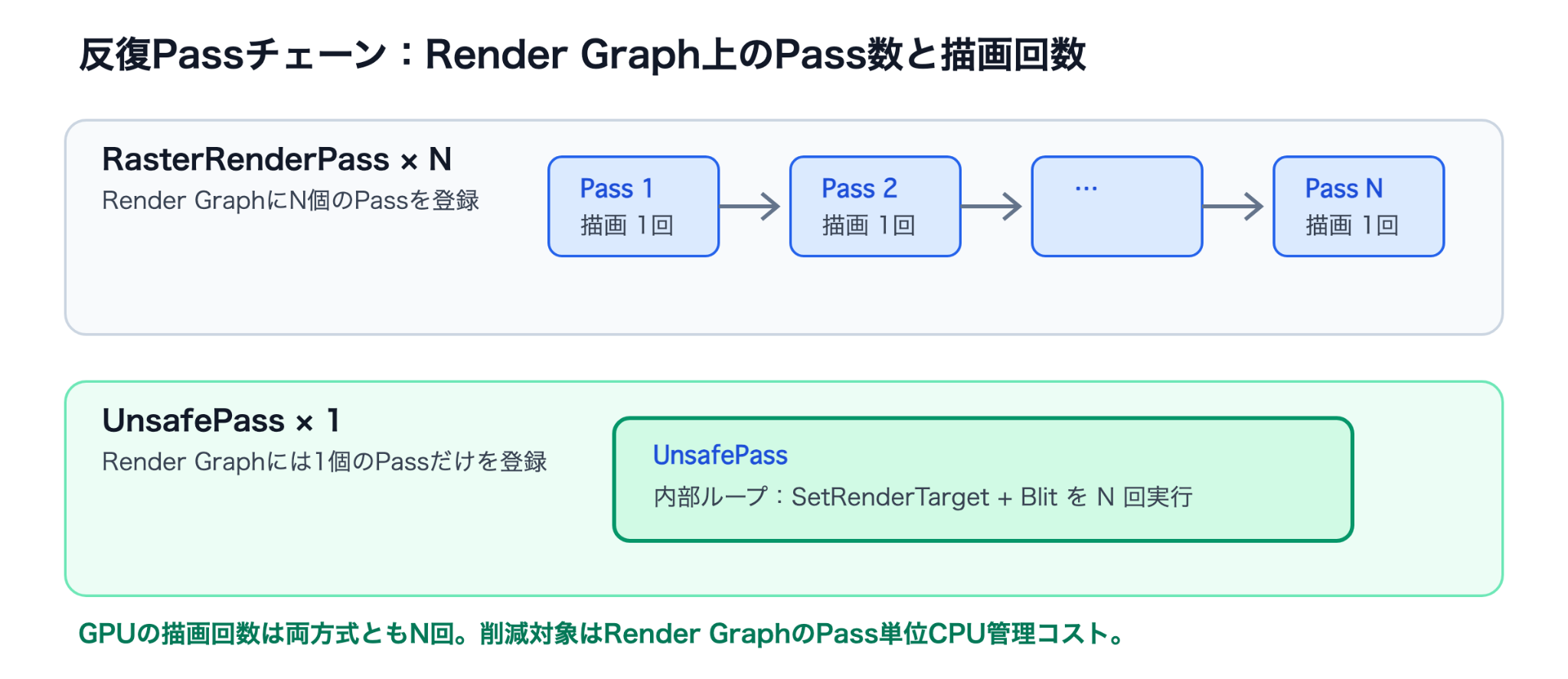
Figure 2.1: Number of passes in Render Graph and number of draws for a chain of passes that cannot be merged
Measurement Example of the CPU Load Reduction
In a measurement in the Editor performed in this project, for a 4-tap ping-pong blur on a 256×256 Render Texture, a method that registers a RasterRenderPass for each blur operation was compared with a method that executes the whole series in a single UnsafePass. The measurement conditions were Apple M4 Max (macOS 26.5), Unity 6000.3.19f1, and URP 17.3. 500 frames were captured for each combination, and the median was used after excluding the 60 frames following the switch. The measured value is the sum of the CPU markers for Render Graph recording, hash calculation, compilation, and execution.
Table 2.1: Comparison of Render Graph-related CPU time in ping-pong blur
| Blur count | RasterRenderPass×N (µs) | UnsafePass×1 (µs) | Difference (µs) |
|---|---|---|---|
| 5 | 286.4 | 280.0 | 6.4 |
| 10 | 334.8 | 313.6 | 21.2 |
| 20 | 427.8 | 389.1 | 38.7 |
| 50 | 675.9 | 592.9 | 83.0 |
| 100 | 1080.7 | 898.5 | 182.2 |
The measured values are for checking trends in the Editor environment. As the blur count increases, the difference between the RasterRenderPass method and the UnsafePass method widens. In a linear fit, the difference between the slopes of the two methods, that is, the additional fixed cost of a RasterRenderPass, was about 1.8µs per pass. This value was measured in the Editor and does not indicate an absolute value on a physical device, but it confirms that the CPU load difference grows with the blur count. This effect comes from the reduction in per-pass registration and management costs, such as Render Graph recording, execution, profiling scopes, and render target setup. Because there is no difference in draw commands, converting to UnsafePass does not reduce rendering load.
It Also Makes the Render Graph Viewer Easier to Read
When many RasterRenderPasses are registered, the Render Graph Viewer displays as many passes as were registered. The graph becomes long horizontally, so the boundaries between features are hard to see and resource dependencies are harder to grasp (Figure 2.2).
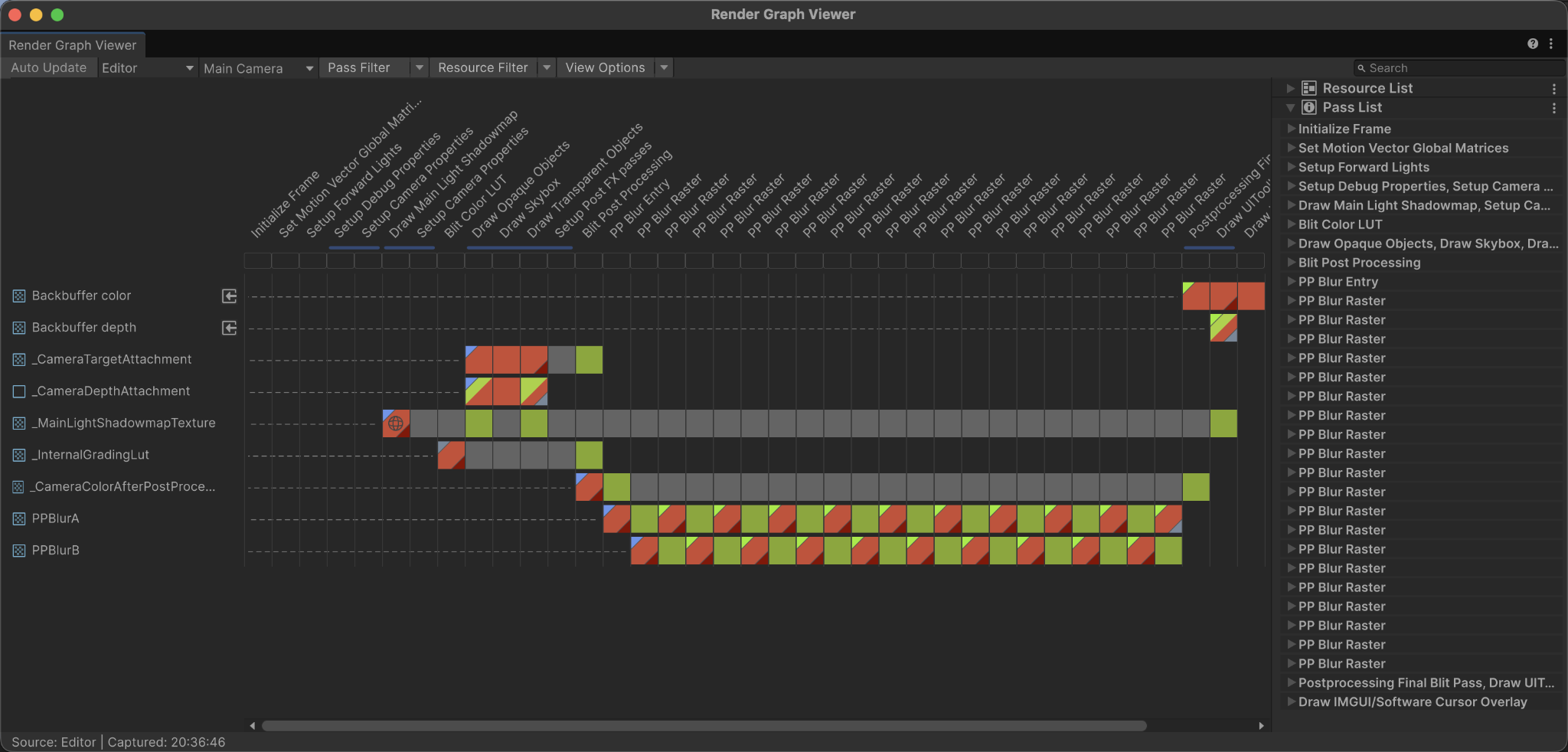
Figure 2.2: Render Graph Viewer display when a RasterRenderPass is registered for each blur operation
If the pass chain inside a feature is combined into a single UnsafePass, the Viewer shows it as one pass representing the whole feature (Figure 2.3). This makes the boundaries between features clear and makes resource dependencies easier to grasp.
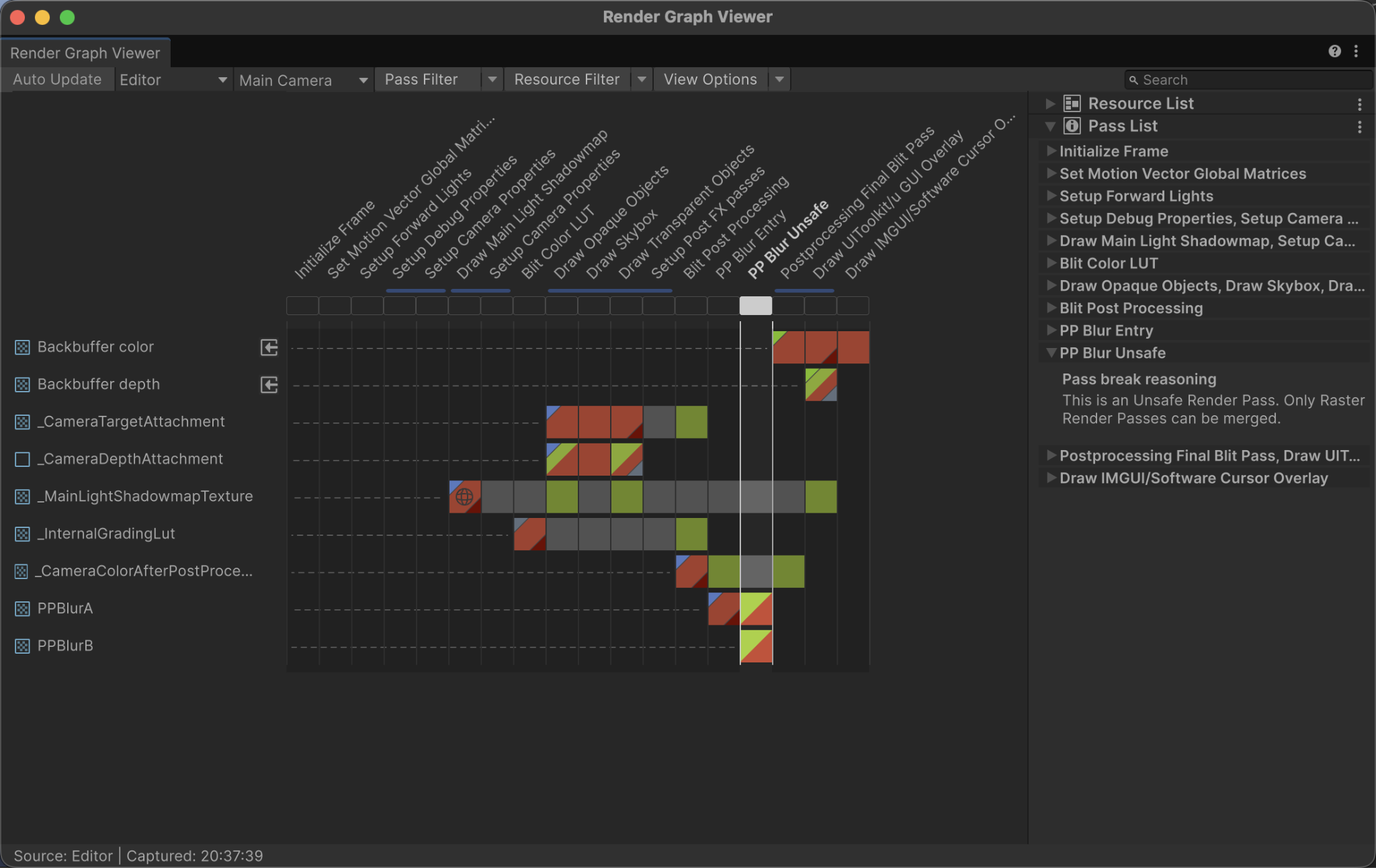
Figure 2.3: Render Graph Viewer display when the series of blur operations is combined into a single UnsafePass
In addition to the reduced CPU load, another significant advantage is that noise during profiling is reduced.
However, it is not recommended to force operations of different features, or operations for which subpass merging applies, into an UnsafePass solely to make the Render Graph Viewer easier to read.
2.3. Notes on Using UnsafePass
2.3.1. Setting Render Targets
In RasterRenderPass, render targets are declared at recording time with SetRenderAttachment, whereas in UnsafePass they are set by calling SetRenderTarget at execution time.
2.3.2. Declare Dependencies
Using UnsafePass does not completely detach you from Render Graph. You must always declare read/write dependencies for the textures you use with UseTexture. If a declaration is missing, resource lifetime management and synchronization are not performed correctly.
In RasterRenderPass, the use of a render target is declared with SetRenderAttachment, but in UnsafePass, calling SetRenderTarget alone does not register a dependency. You must also declare read/write dependencies for render targets with UseTexture.
2.3.3. Setting Load/Store Actions
RenderBufferLoadAction specifies how the existing contents are handled when the render target is enabled, and RenderBufferStoreAction specifies how the result is handled after rendering completes. On tile-based GPUs, unnecessary Load and Store operations increase transfers between tile memory and main memory, so appropriate settings are important.
In RasterRenderPass, Render Graph automatically determines the Load/Store Actions based on the declared AccessFlags. In UnsafePass, however, if you omit the actions, as in SetRenderTarget(target), the default behavior of Load/Store is applied, and unnecessary memory transfers can degrade performance.
Therefore, in UnsafePass, always specify the Load/Store Actions explicitly when calling SetRenderTarget.
- Load side: use DontCare if the whole screen is overwritten, and Load only if the existing contents are read
- Store side: use Store if the result is read by later processing, and DontCare only if it is not used anywhere
2.4. Code Example: A Ping-pong Blur Chain of Passes That Cannot Be Merged
This section presents actual code examples. Note that the code shown is an excerpt to illustrate the key points and is not complete code that works as is.
This is an example that applies blur repeatedly while alternately reading from and writing to two textures. It first shows the same processing implemented with RasterRenderPass, and then the version combined into a single UnsafePass. desc is the render texture descriptor for the blur, and blurMaterial is the material for the blur.
2.4.1. RasterRenderPass Method: Register a Pass for Each Blur Operation
In the RasterRenderPass method, as in List 2.1, AddRasterRenderPass is called for each blur operation in a loop. The input and output of each pass can be declared clearly, but as the blur count increases, the number of passes in Render Graph also increases.
List 2.1: Implementing ping-pong blur with RasterRenderPass
1 2 3 4 5 6 7 8 9 10 11 12 13 14 15 16 17 18 19 20 21 22 23 24 25 26 27 28 29 30 31 32 33 34 35 36 | class BlurRasterPassData { internal TextureHandle source; internal TextureHandle target; internal Material material; } var ping = renderGraph.CreateTexture(desc); var pong = renderGraph.CreateTexture(desc); var current = resourceData.activeColorTexture; var writePing = true; for (var i = 0; i < blurIterations; i++) { var target = writePing ? ping : pong; using (var builder = renderGraph.AddRasterRenderPass<BlurRasterPassData>( "Ping-pong Blur Raster", out var passData)) { passData.source = current; passData.target = target; passData.material = blurMaterial; builder.UseTexture(passData.source, AccessFlags.Read); builder.SetRenderAttachment(passData.target, 0, AccessFlags.Write); builder.SetRenderFunc((BlurRasterPassData data, RasterGraphContext context) => { Blitter.BlitTexture( context.cmd, data.source, new Vector4(1, 1, 0, 0), data.material, 0); }); } current = target; writePing = !writePing; } |
2.4.2. UnsafePass Method: Execute the Whole Series in One Pass
In the UnsafePass method, as in List 2.2, registration with Render Graph is done once, and render targets are switched inside SetRenderFunc. The draw commands for each blur operation remain, but per-pass management is consolidated into one.
List 2.2: Combining ping-pong blur into a single UnsafePass
1 2 3 4 5 6 7 8 9 10 11 12 13 14 15 16 17 18 19 20 21 22 23 24 25 26 27 28 29 30 31 32 33 34 35 36 37 38 39 40 41 42 43 44 45 46 47 48 | class PingPongBlurPassData { internal TextureHandle source; internal TextureHandle ping; internal TextureHandle pong; internal int iterations; internal Material material; } var ping = renderGraph.CreateTexture(desc); var pong = renderGraph.CreateTexture(desc); var output = blurIterations == 0 ? resourceData.activeColorTexture : blurIterations % 2 == 0 ? ping : pong; using (var builder = renderGraph.AddUnsafePass<PingPongBlurPassData>( "Ping-pong Blur", out var passData)) { passData.source = resourceData.activeColorTexture; passData.ping = ping; passData.pong = pong; passData.iterations = blurIterations; passData.material = blurMaterial; builder.UseTexture(passData.source, AccessFlags.Read); builder.UseTexture(passData.ping, AccessFlags.ReadWrite); builder.UseTexture(passData.pong, AccessFlags.ReadWrite); builder.SetRenderFunc((PingPongBlurPassData data, UnsafeGraphContext context) => { var cmd = CommandBufferHelpers.GetNativeCommandBuffer(context.cmd); var current = data.source; var next = data.pong; var alternate = data.ping; for (var i = 0; i < data.iterations; i++) { cmd.SetRenderTarget( next, RenderBufferLoadAction.DontCare, RenderBufferStoreAction.Store); Blitter.BlitTexture( cmd, current, new Vector4(1, 1, 0, 0), data.material, 0); current = next; (next, alternate) = (alternate, next); } }); } |
2.5. Summary
This chapter described when to use UnsafePass in Render Graph and the points to note when using it.
UnsafePass should be chosen in the following four situations.
- When you need an API that is not exposed in RasterCommandBuffer/ComputeCommandBuffer
- When you need the CommandBuffer itself to pass to external code
- When you want to migrate quickly from Compatibility Mode to Render Graph
- When you want to combine a chain of passes that cannot be merged into a single pass
Combining a chain of passes that cannot be merged into a single UnsafePass reduces the per-pass registration and management cost and also makes the Render Graph Viewer easier to read. In the Editor measurement in this project (Table 2.1), a fixed cost of about 1.8µs per RasterRenderPass was eliminated. Note, however, that the draw commands themselves do not change, so this is not a technique aimed at reducing GPU load.
On the other hand, UnsafePass is also a pass that gives up part of the automatic management and validation done by Render Graph. When using it, be sure to declare dependencies with UseTexture and to specify Load/Store Actions explicitly in SetRenderTarget.
Prefer RasterRenderPass and ComputePass as a rule, and limit UnsafePass to work that cannot be expressed with the declarative API and to tidying up chains of passes that cannot be merged. This lets you combine Render Graph optimization with the flexibility of CommandBuffer.
2.6. References
- Unity Manual - Use the CommandBuffer interface in a render graph (UnsafePass)
https://docs.unity3d.com/6000.3/Documentation/Manual/urp/render-graph-unsafe-pass.html - Unity Manual - Optimize a render graph
https://docs.unity3d.com/6000.3/Documentation/Manual/urp/render-graph-optimize.html - Unity Scripting API - CommandBuffer
https://docs.unity3d.com/6000.3/Documentation/ScriptReference/Rendering.CommandBuffer.html - Unity Scripting API - RenderBufferLoadAction
https://docs.unity3d.com/6000.3/Documentation/ScriptReference/Rendering.RenderBufferLoadAction.html - Unity Scripting API - RenderBufferStoreAction
https://docs.unity3d.com/6000.3/Documentation/ScriptReference/Rendering.RenderBufferStoreAction.html